
Elasticsearch Search & Faceted Navigation. This module replaces PrestaShop’s slow SQL search with a real search engine, Elasticsearch, OpenSearch or Meilisearch, and adds a modern, fully configurable faceted navigation. Customers get instant autocomplete with thumbnails and prices, forgiving typo-tolerant results, and a clean “Filters” experience in a modern modal filter panel. Prices are always the exact, native prices for each customer group and currency. No external server is needed to start: once its main switch is on, it runs on PrestaShop’s native search, and you can connect a search engine whenever you are ready.
This module replaces PrestaShop’s slow SQL search with a real search engine, Elasticsearch, OpenSearch or Meilisearch: and adds a modern, fully configurable faceted navigation. Customers get instant autocomplete with thumbnails and prices, forgiving typo-tolerant results, and a clean “Filters” experience in a modern modal filter panel. Prices are always the exact, native prices for each customer group and currency. No external server is needed to start: once its main switch is on, it runs on PrestaShop’s native search, and you can connect a search engine whenever you are ready.
1. Installation
- In the back office go to Modules → Module Manager → Upload a module and select the module ZIP.
- Once installed, click Configure to open the module dashboard.
- The module installs on the “Native (PrestaShop)” engine by default, with the master switch Enable front-office search set to No, so nothing changes for shoppers until you decide. Set it to Yes on the Search settings tab and save: search, filters and autocomplete then work straight from your catalog, with no external server. The module requires PrestaShop 1.7.7 or later and PHP 7.1 or later.
.local, .test, localhost) are always allowed. When a new version is available it is shown right inside the module. If the web server cannot write to the module’s folder, a warning says so on the page that opens with Configure, so the permissions can be fixed before an update fails.If instead of the confirmation you read "Upload failed", PrestaShop may have disabled the module without telling you: your settings and data stay where they are. How to update a module, and what to do if it says "Upload failed".
2. Choosing a search engine
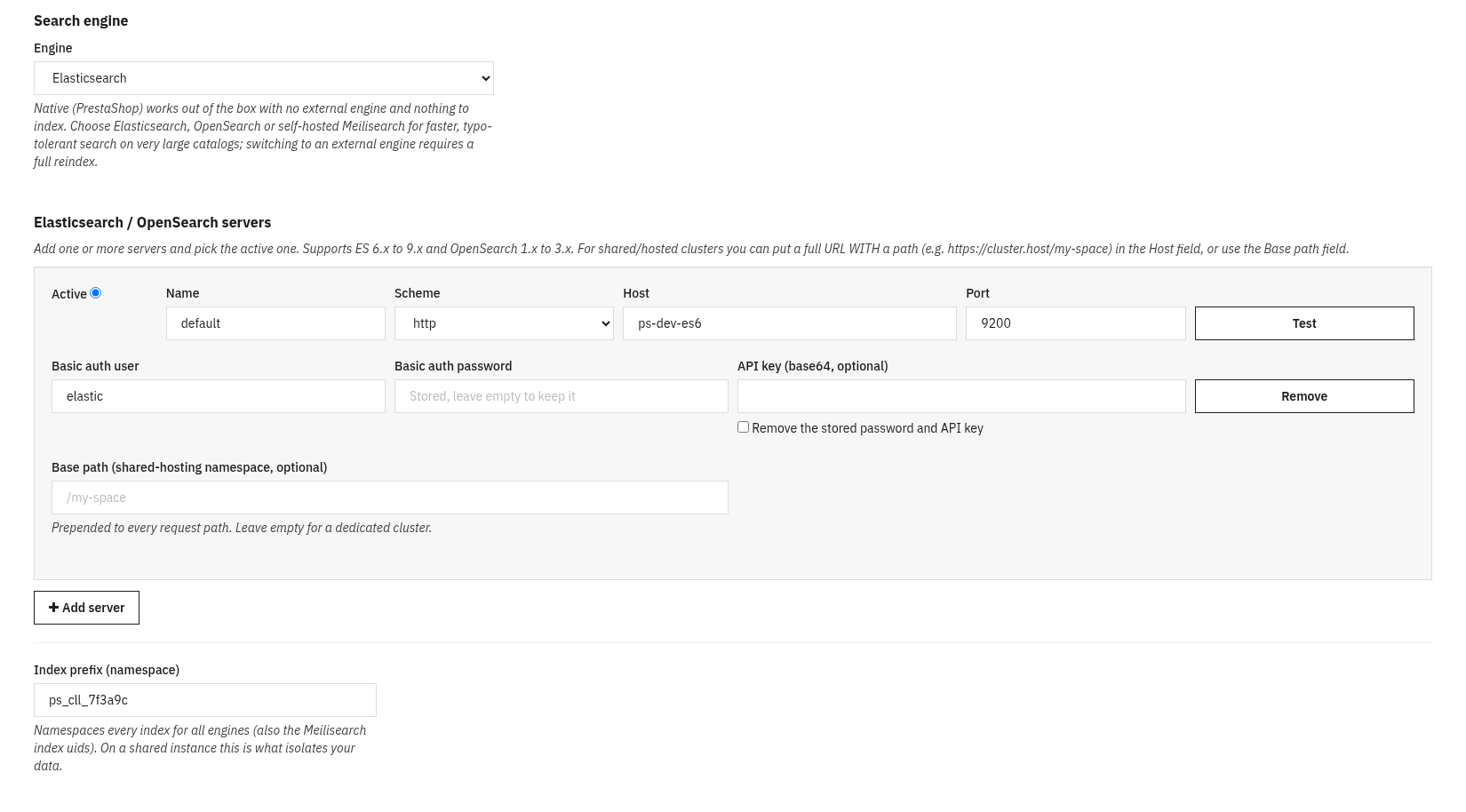
Open the Connections tab and pick your Engine. Everything else in the module talks to the engine through one abstraction, so the storefront behaves the same whichever backend you choose.
Engine options
- Native (PrestaShop): no external engine and nothing to index. The module searches and filters straight from your PrestaShop database. Use this to go live now and connect an engine later; the store is never left without a working search.
- Elasticsearch: supports major versions 6, 7, 8 and 9 with automatic version detection.
- OpenSearch: auto-detected and handled like a modern typeless cluster regardless of its 1.x/2.x/3.x version.
- Meilisearch: a lightweight, easy-to-host alternative; your searchable fields, facets, synonyms, stop-words and typo tolerance are mapped to Meilisearch automatically.
Connection settings
- Host: the full URL of your engine (it may include a path prefix, e.g.
https://cluster.provider.com/my-space). - Base path: an optional path prefix prepended to every request, for rented search space on shared instances.
- Index prefix: a namespace that isolates your indexes, so several stores can safely share one engine. A new installation gets its own random prefix (
ps_cll_followed by six characters); an installation updated from an earlier version keeps its own. - Authentication: for Elasticsearch/OpenSearch: HTTP Basic or API key; for Meilisearch: a Bearer master or scoped key. Once saved, a password or API key is never shown again in the page: leave the field empty to keep it (for the same server), type a new one to replace it, or tick the box to remove it.
- Test connection: verifies the engine is reachable and reports its detected version.
What staying in “Native” mode costs at scale, with our own numbers
“Native” mode gets the store live immediately, but on a large catalogue PrestaShop’s native engine has a real cost worth knowing before you find it in production. The most common cause is not “the database is slow”: it is that the same computation (which products match the current search) gets redone from scratch for every filter instead of being computed once and reused, so the cost stops being proportional to the number of products and becomes proportional to the number of products multiplied by the number of filters.
On a synthetic 200,000-product catalogue, using the native engine alone, a search results page took 28 seconds and a large category page 30 seconds before a focused round of optimisation; afterwards, the same page takes between 2 and 6 seconds. Still seconds, not milliseconds: that is the practical reason why, past a certain catalogue size, connecting Elasticsearch, OpenSearch or Meilisearch stops being a luxury and becomes what keeps the page responsive.
3. Search behaviour
Taking over site search
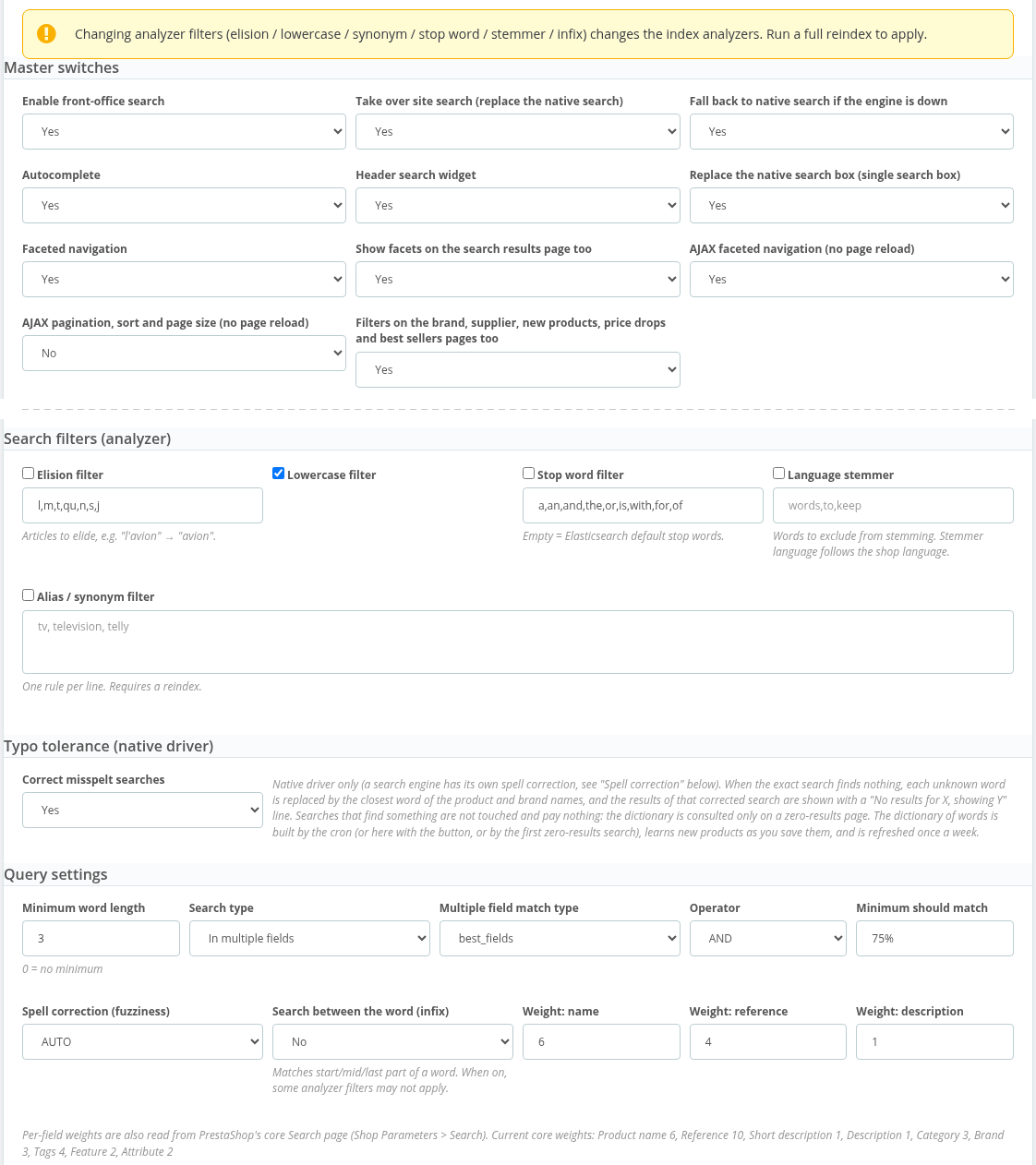
Turn on Take over site search so every search and category listing is served by the engine through PrestaShop’s native product provider, no theme edits. If the engine ever becomes unreachable, or answers a listing with an error, the module automatically falls back to native search so the store never shows an error. An engine that stops answering is left alone for 30 seconds before one quick check, so a slow or blocked engine never holds up the shop’s pages; product changes it missed meanwhile are sent by the next cron call. If ps_facetedsearch is still active, the module’s configuration page warns you (with a “Do not show this again” button for a shop that keeps it on purpose), since you normally want only one faceted module running.
Customer groups, hidden prices and exact codes
Products and categories reserved for some customer groups stay reserved: the module applies PrestaShop’s own rule (a product is shown only when one of its active categories is open to one of the shopper’s groups) to search results, filters and their counts, autocomplete, category shortcuts, featured products and the zero-result page. Prices follow PrestaShop too: a suggestion shows a price, and the price filter appears, only when PrestaShop itself would show prices to that shopper. A search that is exactly a reference, EAN-13, UPC or MPN lists only the products carrying it.
Relevance & tuning
The search-settings panel lets you shape relevance without touching code:
- Field weights: how much the name, reference, description, etc. count toward the score.
- Match type & operator: the multi_match strategy and whether words are combined with AND or OR.
- Fuzziness & minimum-should-match: how forgiving typo tolerance is and how many words must match.
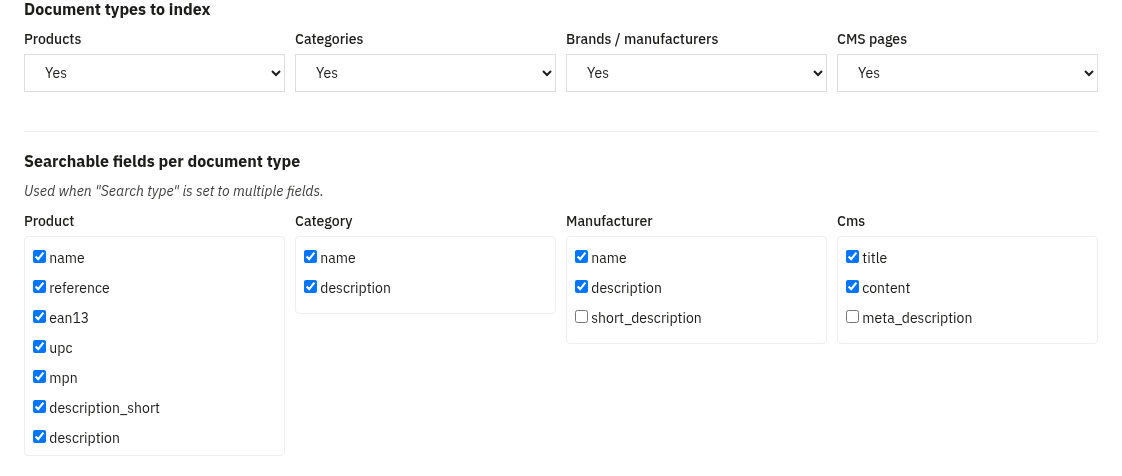
- Minimum word length and the searchable-fields scope per document type. A shorter term is not ignored: two-letter terms such as “tv” are searched exactly, without typo tolerance.
- Language analysis: synonyms, stop-words, per-language stemmer (with exclusions), elision, lowercase and infix (n-gram) matching for partial words.
How typo tolerance actually works
Behind the “Fuzziness” switch are two genuinely different mechanisms with different costs. With Elasticsearch and OpenSearch, fuzzy matching runs at query time: the engine compares the search term against already-indexed terms using edit distance (how many substitutions, insertions or deletions turn one word into the other), with no need to know in advance which misspellings exist. With the native engine, which has no built-in fuzzy matching, the module instead relies on a trigram dictionary built from the catalogue’s own product and brand names: terms are indexed by three-letter fragments, which narrows the list of plausible candidates before computing exact edit distance on a much smaller set.
The detail that keeps the dictionary cheap, instead of slowing down every search, is when it runs: only after the exact search has already come back with zero results. A correctly spelt query never touches it. Measured on a real catalogue, a correct query and a misspelt one that triggers the dictionary took the same, small amount of time either way (0.16 to 0.19 seconds on that setup). The dictionary is also rebuilt on a schedule (for instance weekly, plus a lazy top-up whenever a zero-result search meets a word it does not know yet), so it stays aligned with the catalogue as it changes.
4. Faceted navigation
The faceted navigation is a modern, AJAX experience, no page reloads, with a classic sidebar mode available as an alternative (Facet UI option: modal or sidebar).
The modern modal filter panel
- Above the product grid sit a “Filters” button, the live result count and removable chips for every applied value (“Clear all” removes them all).
- Clicking Filters opens a two-pane modal: filter names on the left (with a badge when a filter is in use), the selected filter’s values on the right, and a live “Show N results” button in the footer.
- Filters with many values are grouped A→Z with a “search within this filter” box; colours render as swatches; price shows min/max inputs plus a dual-thumb slider.
- On mobile the modal is full-screen: tap a filter name to drill down to its values, use the back arrow to return, and confirm with a fixed bottom “Show N results” bar.
- Everything updates by AJAX with shareable URLs (back/forward works), and there is a no-JavaScript fallback because every control is a real form control.
Configuring each facet
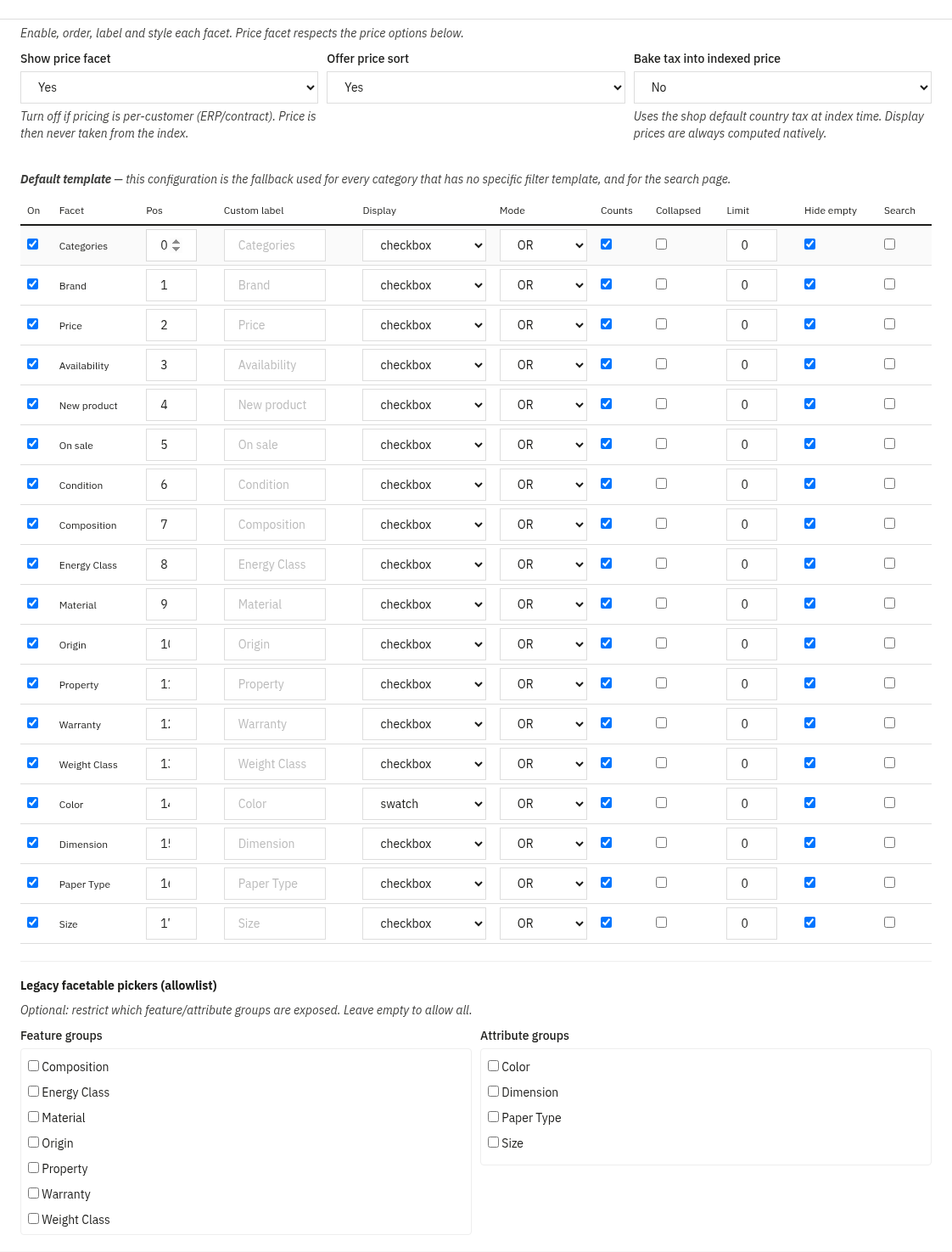
For every facet you control: on/off, order, label per language, display type (checkbox, radio, dropdown, colour swatch for colour groups, or a slider for the price, the measurements and numeric features), AND/OR mode, whether to show counts, collapse state, a value limit with “show more”, and hide when empty. Available sources: categories, brands, features, attributes, price, availability, new, on sale and condition. Facets can also be shown on the search results page and, with one switch, on the brand, supplier, new products, price drops and best sellers pages, not just categories. On Elasticsearch and OpenSearch each feature or attribute group is counted with the selections of the other groups applied, so choosing a colour also updates the numbers next to sizes (on the native engine and on Meilisearch each group is still counted on its own).
Per-category filter templates Filters Pro
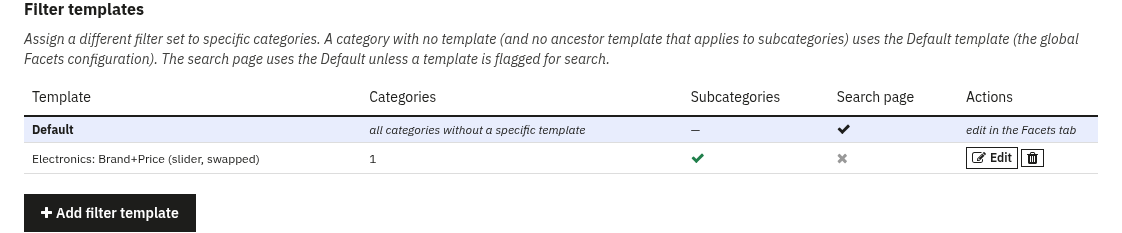
A filter template is a named, reusable facet configuration you can assign to one or more categories, so different categories can expose a different, reordered set of filters. In the Filter templates tab you create a template with the same facet editor as the global config, plus a category tree and an “also apply to subcategories” option. The global Facets configuration is the Default template: the fallback for any category without its own template, and for the search page.
Why turning off counts pays off on large catalogues
Each facet’s “show counts” option (above) has a cost that depends on the engine. With an external engine the count comes for free, as a by-product of the same query that computes the results, it is the engine’s own aggregation mechanism, not an extra query per value. With the native engine, every single filter value can require its own counting query. On a 200,000-product catalogue with around 2,000 active facet groups, turning off exact counts took a category page from 43 seconds to 12 seconds; on the feature and attribute facets alone, from 6.8 and 5.4 seconds to 15 and 19 milliseconds. On a catalogue of a few thousand products, counts are almost always worth their cost; on a catalogue of hundreds of thousands with many features, they can be the single most expensive part of the page, and turning them off is often a checkbox, not a rewrite.
Correct counts even with multi-select filters
A count that promises “Red (12)” and a listing that then shows 8 or 15 is not a cosmetic detail: it is a sign the count and the click are answering two different questions. The typical case is a filter with several values grouped under one label (for example “Red” covering the Crimson, Scarlet and Burgundy variants): if the count sums how many times each variant appears while the click applies “must have all of them together” instead of “must have at least one”, the number shown and the number obtained never match. The fix, verified on both the native driver and Elasticsearch, is to treat the group as a single set from the start (one count of distinct products having at least one of the values, not a sum), so the count and the click share exactly the same logic. With Meilisearch, when a count like this cannot be guaranteed exact, the module prefers to show no number at all rather than a wrong one: a filter with no count is always better than a filter that lies.
The hidden cost: computing in application memory instead of in the engine
A different bug, found during an internal code review, concerned the price facet’s range: computing the minimum and maximum by loading every matching value into application memory instead of asking the database or the search engine to do it. On a catalogue where that meant roughly two million rows, that single step cost 11 seconds and 965 MB of memory per request, enough to exhaust a shared hosting memory limit and return an error page instead of the slider. Pushing the same calculation into a database or search-engine aggregation turned it back into a normal, fast query: it is exactly the kind of computation these systems are built to do in one pass over already-indexed data, not in application code after the fact. The bug has been fixed, and it is why, in the module, every min/max and every count is always computed by the engine or the database, never by a PHP loop over rows.
5. Autocomplete
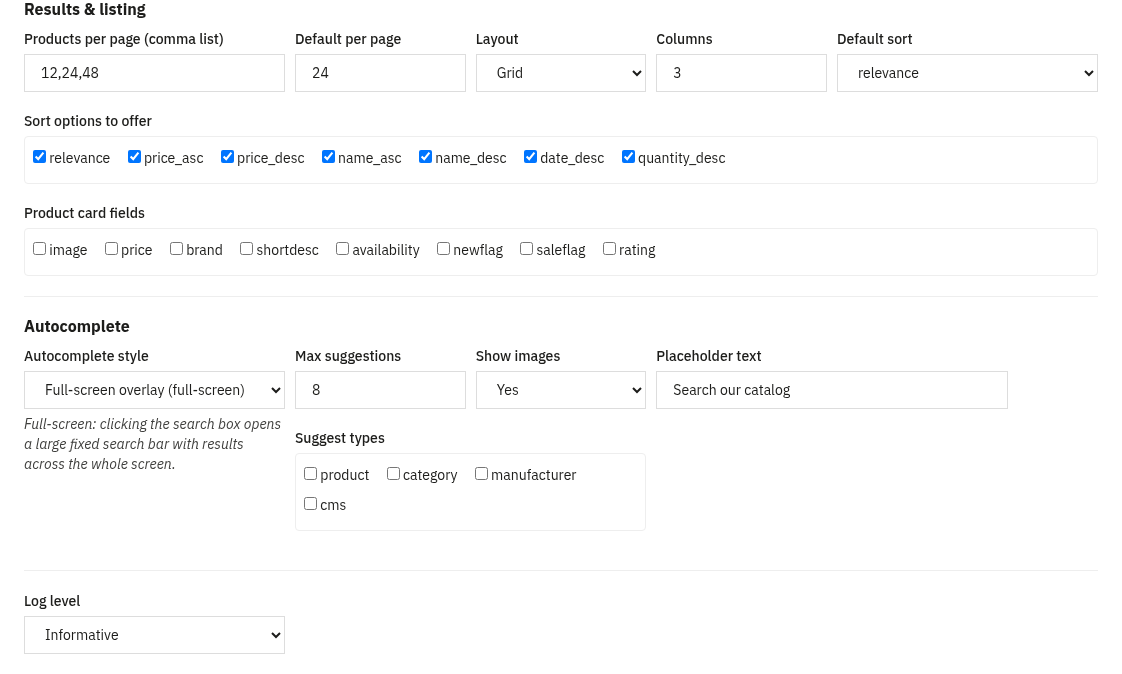
As the customer types, the module suggests products, categories, brands and CMS pages: each labelled by type, with product thumbnails and the correct native price (only when PrestaShop would show prices to that shopper), and typo-tolerant so small mistakes still match. Two presentations are available (Autocomplete style under Output):
- Dropdown: a suggestions panel that opens under the search bar. The classic, compact style.
- Full-screen search overlay: a large fixed search bar with full-screen results, for a bold, search-first experience.
6. Prices done right
Correct prices per group and currency
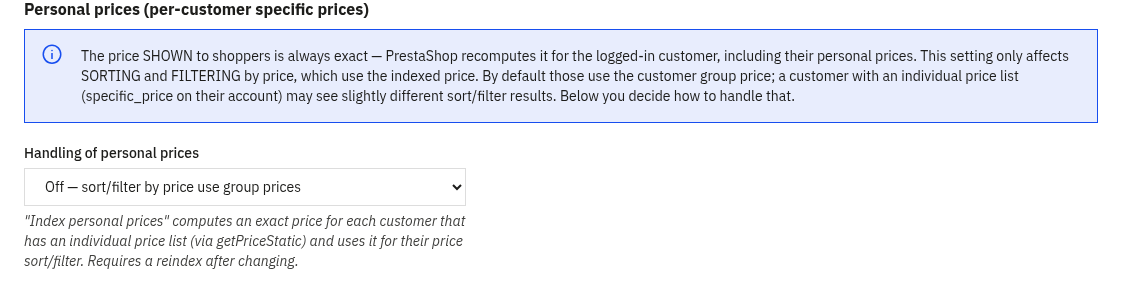
The price a customer sees is always the native PrestaShop price. Prices are indexed per customer group × currency, are specific_price-aware and account for per-country tax, and the right value is picked at query time. This means the optional price facet and price sorting are accurate for every shopper, a wholesale group and a retail group each see and sort by their own prices.
Personal prices for B2B Advanced
On the Advanced tab you can enable personal prices. For B2B customers who have an individual price list (a specific_price assigned to the customer), sorting and filtering by price can use their exact personal price rather than the group price. A configurable cap (fixed, or automatic based on the engine’s free disk space) limits how many customers this is precomputed for, and an optional per-language notice can be shown to those shoppers.
7. SEO filter pages
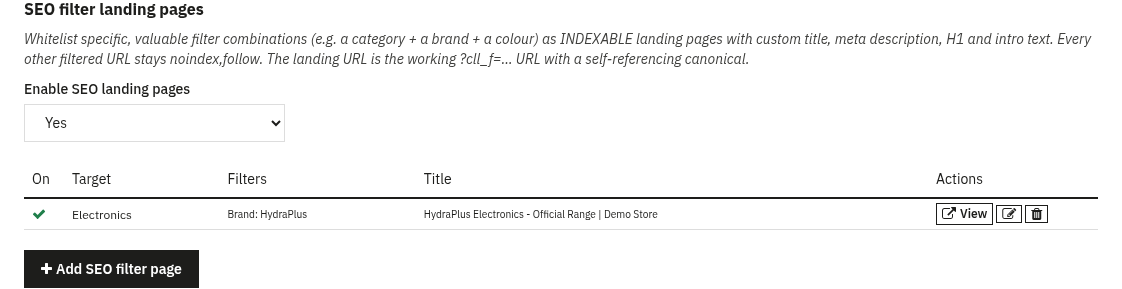
Endless filter combinations would flood Google, so by default every filtered URL is served as noindex,follow. The SEO filter pages tab lets you do the reverse for the combinations that matter: whitelist a specific selection (for example category + brand + colour) as an indexable landing page with a custom meta title, meta description, H1 and intro text per language.
- A matched page is forced to
indexand given a self-referencing canonical to the filtered URL, so it can actually rank. - Your custom H1 and intro are rendered above the product listing; the H1 field has the look of the page title but is output as a second-level heading, since the theme already prints the page’s own H1.
- All other filtered combinations stay
noindex,follow. - The back-office list shows each page’s live URL, ready to submit or link.
8. Search analytics
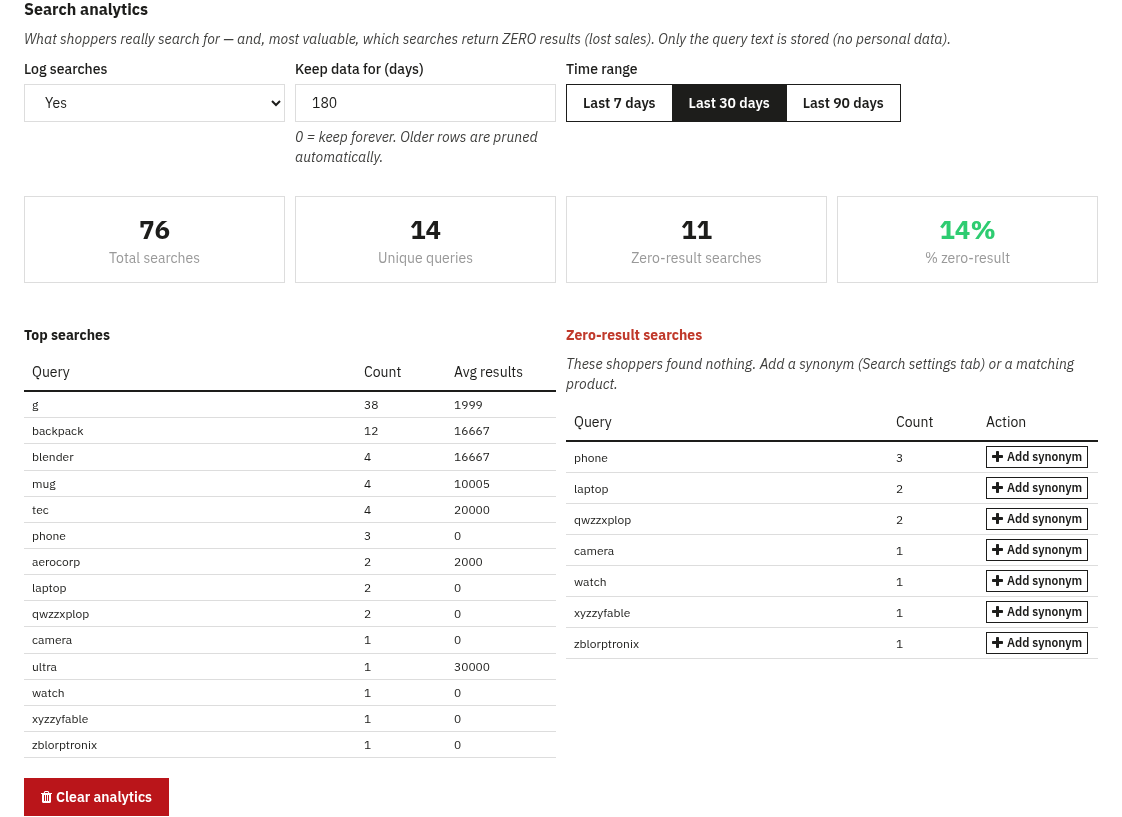
The Search analytics tab shows what customers really search for, recorded from actual results pages, never from autocomplete keystrokes, and storing only the query text (no personal data). Pick a date range (last 7 / 30 / 90 days) and see KPIs (total searches, unique queries, zero-result count and %), a Top searches table and, most usefully, a Zero-result searches table, the searches that found nothing, i.e. lost sales. Each zero-result row has a one-click “Add synonym” shortcut so you can fix it immediately. Logging can be turned off and old rows are pruned automatically after a configurable retention period. A term counts once per visitor per day, and one visitor logs at most 30 searches a day, so a single visitor cannot inflate the figures.
9. Reindexing & cron
The engine needs an index of your catalogue. The module indexes products, categories, brands and CMS pages, each in its own index, and keeps them up to date live as you save, add or delete products and as stock changes.
- Reindex assistant: a guided, batched and resumable reindex with a progress bar. Run it after the first engine connection, after switching engine, after changing analyzer settings, or after changing which customer groups can see a category. Only one rebuild of an index runs at a time, so the cron and the button never undo each other’s work.
- Cron URL: a token-protected URL you can call from a scheduled task (or CLI) to keep the index fresh automatically; it also sends the product changes queued while the engine was not answering, and prunes old analytics rows.
- Delete indexed data: clears the engine’s indexes when you want a clean rebuild.
Updating stock without slowing down checkout
With an external engine every product lives twice: a row in PrestaShop’s database and a document in the engine’s index. When a customer changes a cart quantity or an order is confirmed, that product’s availability has to update in the index too. The most expensive way to do it is to rebuild the whole document from scratch on every change, even when only three numbers change (quantity, availability, an availability-based sort order). Measured on PrestaShop 9.0.0 with two shops connected to Elasticsearch, a five-line order that rebuilt the full document per line cost 243 database queries and 229 milliseconds, just to move three numbers into the index. With a dedicated path that updates only the fields that actually changed, instead of rebuilding the whole document, the same order dropped to 9 queries and 16-47 milliseconds. That is why the module keeps stock updates (real-time, targeted) separate from structural reindexing (when the name, price or categories actually change): a cart quantity change should never pay the cost of a full reindex.
10. Multistore & shared hosting
Multistore
Connection and engine settings are per shop. In an “all shops” context they are saved globally; in a single-shop context they are saved for that shop, with a global fallback. This means different shops can point at different engines or clusters, while a single-shop install behaves exactly as before.
Shared hosting / rented search space
You do not need your own dedicated cluster. Point the Host at a shared endpoint with a path prefix, set the Base path and an Index prefix (namespace), and add the provider’s API key. Every request is scoped to your prefix, so your data stays isolated on a shared instance, and it works the same across Elasticsearch, OpenSearch and Meilisearch.
11. FAQ
Do I need Elasticsearch to start?
No. The module installs on the “Native (PrestaShop)” engine: set “Enable front-office search” to Yes and search, filters and autocomplete work straight from your catalog, with no external server. Connect Elasticsearch, OpenSearch or Meilisearch whenever you are ready.
What happens if my search engine goes down?
The module automatically falls back to native search, so customers can always search: the store never shows an error. A server that stops answering is left alone for 30 seconds before one quick check, so it never slows the pages down, and the product changes it missed are sent by the next cron call.
Are the prices shown to customers correct?
Yes. The displayed price is always the native PrestaShop price. The engine is only used to filter and sort, using prices indexed per customer group and currency (and, optionally, each B2B customer’s personal price).
Will it clash with ps_facetedsearch?
You normally want only one faceted module active. The module’s configuration page warns you if ps_facetedsearch is still on, with a Disable button; if you keep it on purpose, “Do not show this again” hides the reminder.
Can different categories show different filters?
Yes. Create filter templates and assign them to categories (optionally including subcategories). Categories without a template use the global default.
Which engine should I choose?
The native engine needs no server and is where every installation starts. Elasticsearch is the most common choice for large catalogues; OpenSearch is a drop-in equivalent. Meilisearch is the lightest to host and a great fit for shared hosting or smaller catalogues.