
Age Verification Gate (18+ / configurable). Age Verification Gate adds a configurable age-verification gate for goods subject to a minimum age (18+ or any value you set). Choose whether to gate the whole site, only flagged products and categories, or only at checkout; pick a simple yes/no confirmation or a real date-of-birth check; and remember the visitor's choice with a cookie. The blocking overlay is accessible and fully styleable. No coding, no theme edits. Note: a client-side gate is a diligence/UX measure, not a strong legal barrier.
Age Verification Gate adds a configurable age-verification gate for goods subject to a minimum age (18+ or any value you set). Choose whether to gate the whole site, only flagged products and categories, or only at checkout; pick a simple yes/no confirmation or a real date-of-birth check; and remember the visitor's choice with a cookie. The blocking overlay is accessible and fully styleable. No coding, no theme edits. Note: a client-side gate is a diligence/UX measure, not a strong legal barrier.
1. Installation
- In the back office go to Modules → Module Manager → Upload a module and select the module ZIP.
- Once installed, click Configure to open the settings.
.local, .test, localhost) are always allowed. When a new version is available it is shown right inside the module.If instead of the confirmation you read "Upload failed", PrestaShop may have disabled the module without telling you: your settings and data stay where they are. How to update a module, and what to do if it says "Upload failed".
2. Configuration: step by step
The Configure screen has two panels: the gate Settings and the Targeting manager. Set up the behaviour first, then (if you gate only specific items) flag the products and categories.
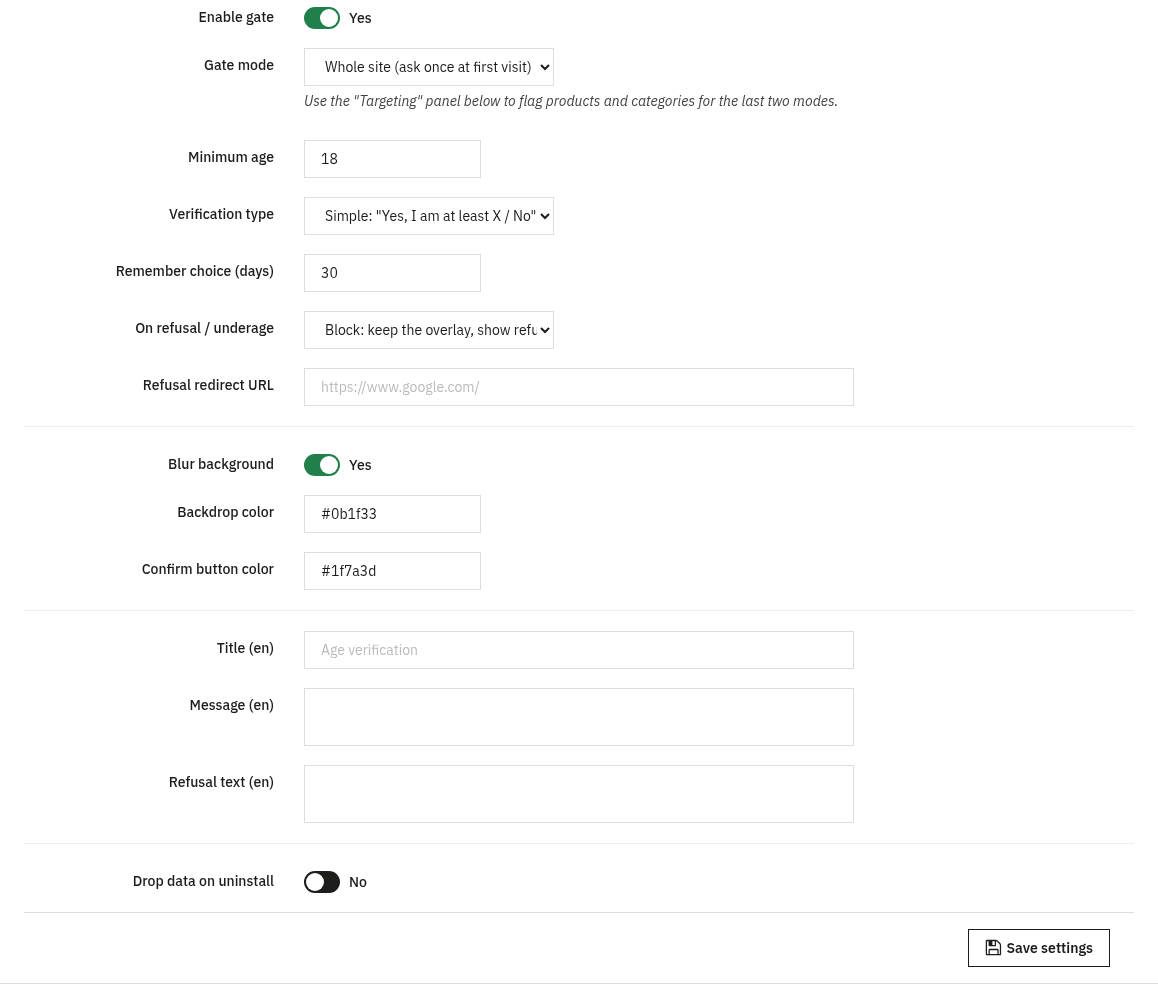
Age Verification - Settings core
Define when the gate appears, how the visitor is checked, what happens on refusal, and how the overlay looks. Texts are per language.
- Enable gate: the master on/off switch. Nothing is shown to visitors until this is on.
- Gate mode: Whole site (ask once at first visit), Only on flagged products/categories, or Only at cart/checkout when a flagged product is present.
- Minimum age: the required age (1 to 120), e.g. 18.
- Verification type: Simple: "Yes, I am at least X / No" or Date of birth (real age is computed).
- Remember choice (days): cookie duration (1 to 3650) so a confirmed visitor is not asked again; with Block a refusal is also remembered for the same number of days, with Message it is not and the visitor can try again right away.
- On refusal / underage: Block: show the refusal text, remembered in the browser, Message: show the refusal text with a "Try again" button, or Redirect to a URL.
- Refusal redirect URL: where to send a refused visitor when the action is Redirect (must start with
http(s)://or/). - Blur background, Backdrop color and Confirm button color: the overlay appearance (colors as
#rrggbb). - Title, Message and Refusal text: the wording shown in the overlay, editable per language.
- Drop data on uninstall: whether to remove the module's settings and targeting when you uninstall.
Age-restricted targeting flagged mode
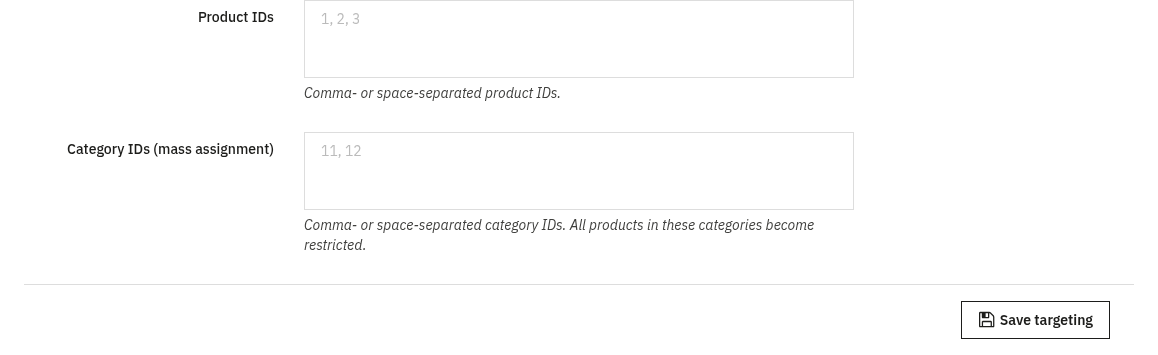
Used when the gate mode is Only on flagged products/categories or Only at cart/checkout. Here you choose exactly which catalogue items are age-restricted. No core files are changed: flags are stored in the module's own table.
- Product IDs: comma- or space-separated product IDs to flag as restricted.
- Category IDs (mass assignment): comma- or space-separated category IDs; all products in these categories become restricted.
3. Check that it works
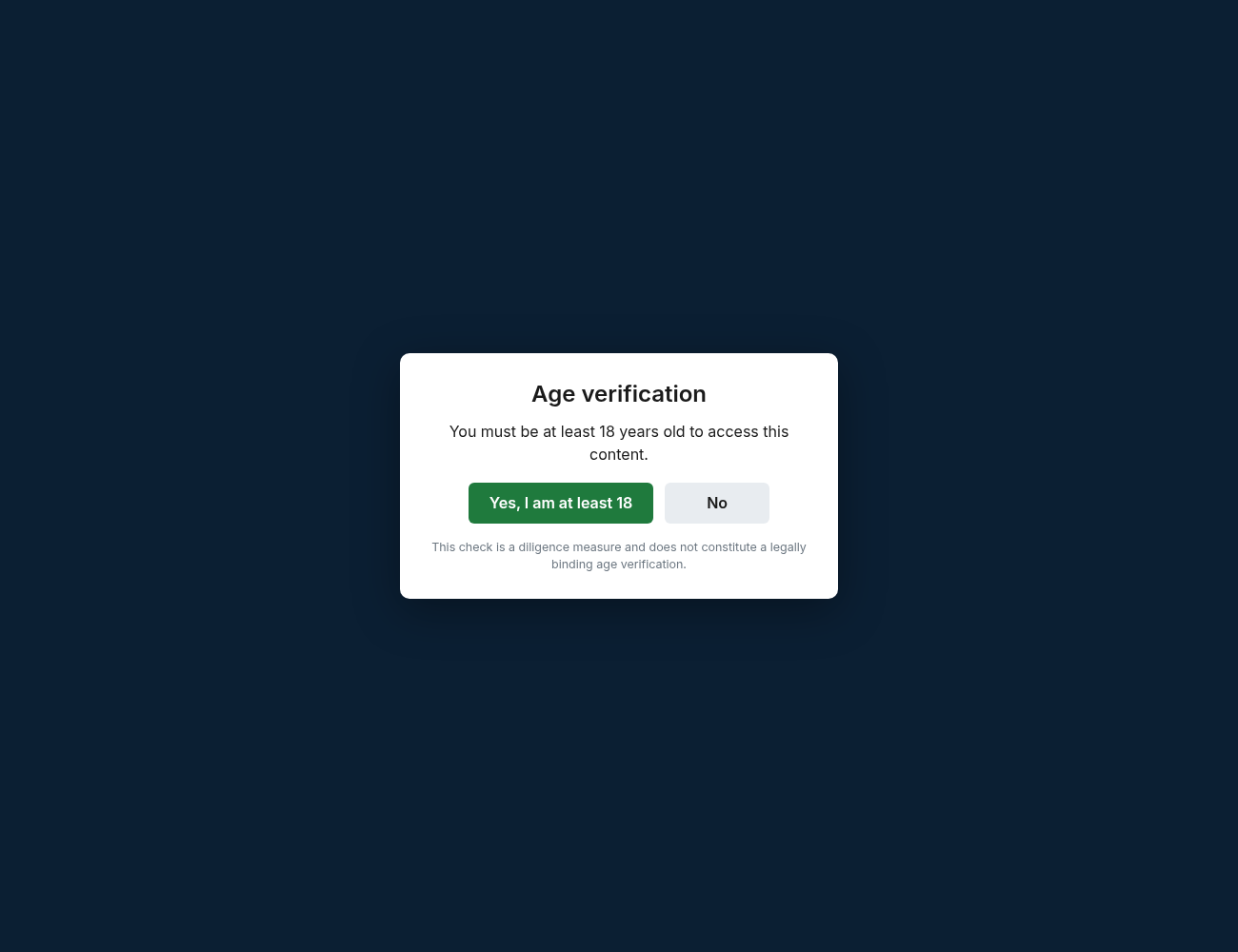
- Open a fresh / incognito session and visit a targeted page (or any page in Whole-site mode): the blocking overlay should appear over the content, as above.
- Pass the check (confirm you meet the minimum age) and browse on: within the Remember choice window you should not be asked again.
- In Whole-site mode, fail or refuse the check and confirm the configured refusal action (block message or redirect) takes effect.
- In flagged mode, visit a non-targeted page and confirm it is unaffected: no overlay should appear there.
4. FAQ
Is this a legal age-verification system?
No. A client-side gate is a diligence and UX measure to discourage underage access: it is not a strong legal barrier. Use it alongside, not instead of, any compliance requirements that apply to you.
Will it block search engines or hurt SEO?
The gate is a front-office overlay; your pages and their content remain available. Use flagged mode to limit it to the products and categories that actually need it.
Do I need to edit my theme?
No. The module works through standard hooks and is compatible with any theme; the overlay colors and texts are configured in Settings.
Why was a visitor asked again?
The choice is remembered with a cookie for the number of days you set. Clearing cookies, using a different browser, or an expired window will show the gate again. Changing the minimum age or the verification type also shows the gate again to every visitor.
5. What a click actually verifies, and what it does not
A client-side gate does not verify any identity: it verifies that a browser sent a click. Anyone, of any age, can click "Yes". Anyone can type a date of birth that makes the math work. A client-side gate is a diligence measure, not a strong legal barrier: this guide already says so at the top, and it is worth explaining why.
What it is actually good for
- It stops accidental exposure. A visitor who lands on a product page by mistake sees a deliberate stop instead of the product straight away: a real, if modest, protective effect.
- It is a documented diligence step. It shows the store asks the question and blocks or warns on a "no", which matters in some regulatory and marketplace contexts even though the check itself is not strong.
- It puts the question on record before the sale, even for a shopper who later lies to get past it.
What it does not do, and cannot do
- It does not verify identity: no document, no third-party check.
- It is trivially bypassed: clearing the cookie, opening a private window, or simply lying, none of the three requires any technical skill.
- It does not satisfy a legal age-of-sale requirement on its own. Where the law requires a real check (for example ID verification at delivery), that check belongs in the sale process itself, not in a browser pop-up: the gate can sit in front of that process as a first, cheap filter, not replace it.
Two technical details that separate a real gate from a suggestion
A real modal must not be dismissible by pressing Escape, clicking outside it, or scrolling past it: it has to trap focus inside the dialog and require an explicit choice (see Verification type and Gate mode in Settings above). And it has to stay reachable by keyboard and describable by a screen reader as a dialog, not just visually blocking: otherwise it becomes a barrier for people with disabilities while doing nothing extra for the age question it was built for.