
SEO Redirects - 301/302/404 manager. SEO Redirects manages 301/302 redirects (plain, wildcard or safe regex), monitors 404 errors and turns them into redirects in one click, auto-creates 301s when a slug changes, imports/exports CSV and detects duplicate URLs. Every target is open-redirect safe. No coding, no theme edits.
SEO Redirects manages 301/302 redirects (plain, wildcard or safe regex), monitors 404 errors and turns them into redirects in one click, auto-creates 301s when a slug changes, imports/exports CSV and detects duplicate URLs. Every target is open-redirect safe. No coding, no theme edits.
1. Installation
- In the back office go to Modules → Module Manager → Upload a module and select the module ZIP.
- Once installed, click Configure. A short panel opens with a Go to configuration button that takes you to the full configuration page.

.local, .test, localhost) are always allowed. When a new version is available it is shown right inside the module.If instead of the confirmation you read "Upload failed", PrestaShop may have disabled the module without telling you: your settings and data stay where they are. How to update a module, and what to do if it says "Upload failed".
2. Configuration: step by step
The module is organised in tabs: Redirects, 404 monitor, Import / Export, Pretty URL helper and Settings. Start in Settings to switch the engine on, then add or import your redirects.
- Redirects: list, filter and bulk-manage your rules, or add one with a source, target, 301/302 type, optional wildcard/regex pattern matching and "append query string" option. Targets must be internal or whitelisted (open-redirect protection).
- 404 monitor: the real 404s that go through PrestaShop are logged here (not static files or bot noise, when the related switches are on; the list has a per-shop cap and old entries are purged after a set number of days); click Create 301 to turn it into a redirect in one step.
- Import / Export: export all rules to CSV (semicolon separated), or import a CSV with columns
source, target, type, is_regex, keep_querystring, activein any order. - Pretty URL helper: surfaces URLs that look like duplicates (same path differing only by case or a trailing slash) so you can redirect the variant to the canonical form.
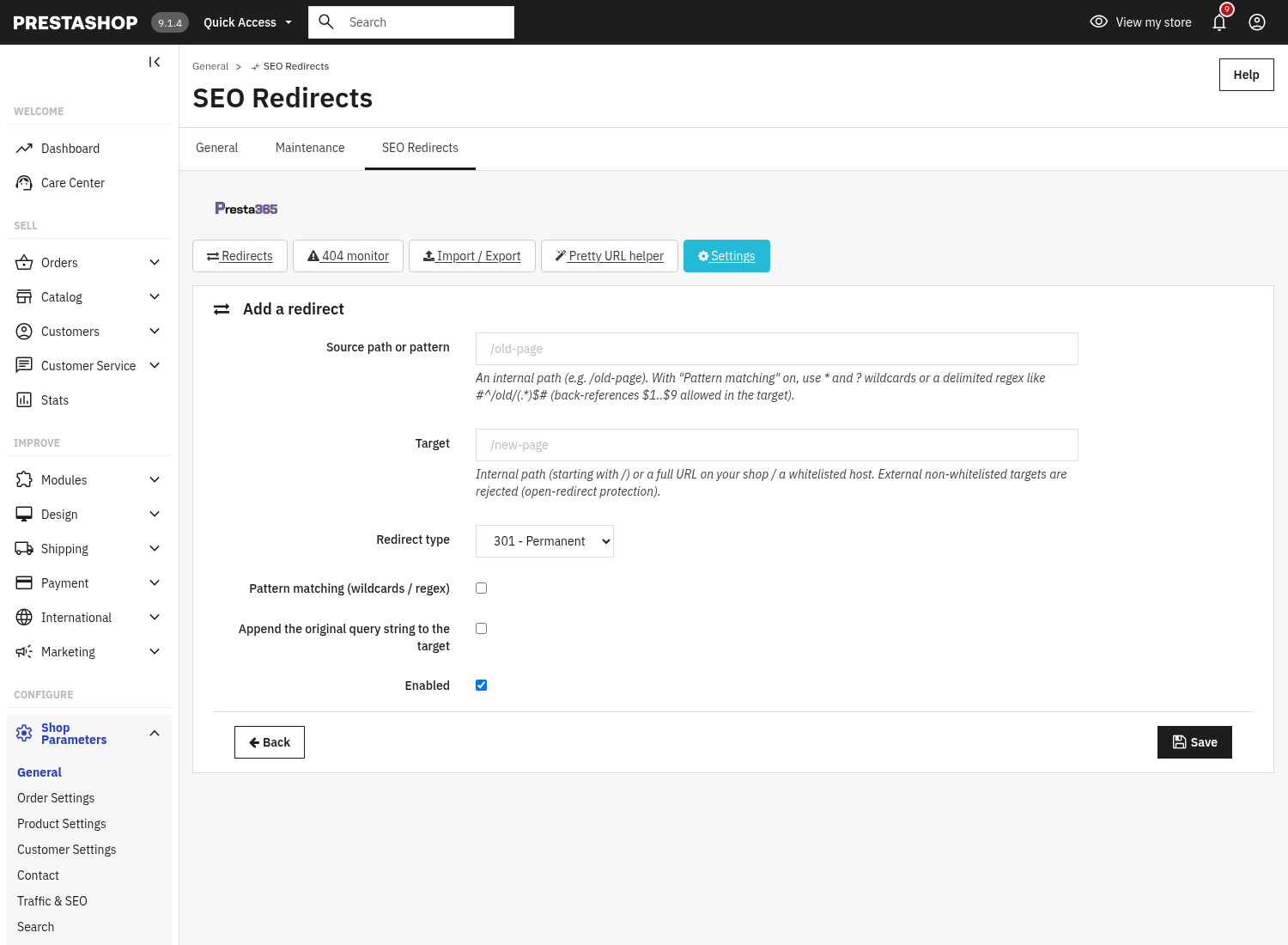
Add a redirect
From the Redirects tab, click Add a redirect to open the rule form.
- Source path or pattern: the incoming path, e.g.
/old-page. With Pattern matching on you can use*and?wildcards or a delimited regex. - Target: an internal path (starting with
/) or a URL on your shop or a whitelisted host. External, non-whitelisted targets are rejected (open-redirect protection). - Redirect type: 301 Permanent or 302 Temporary.
- Shop scope multistore, on a multistore installation the form shows a Shop scope selector: restrict the redirect to one shop, or apply it to All shops.
- Pattern matching and Append the original query string to the target: optional per-rule switches.
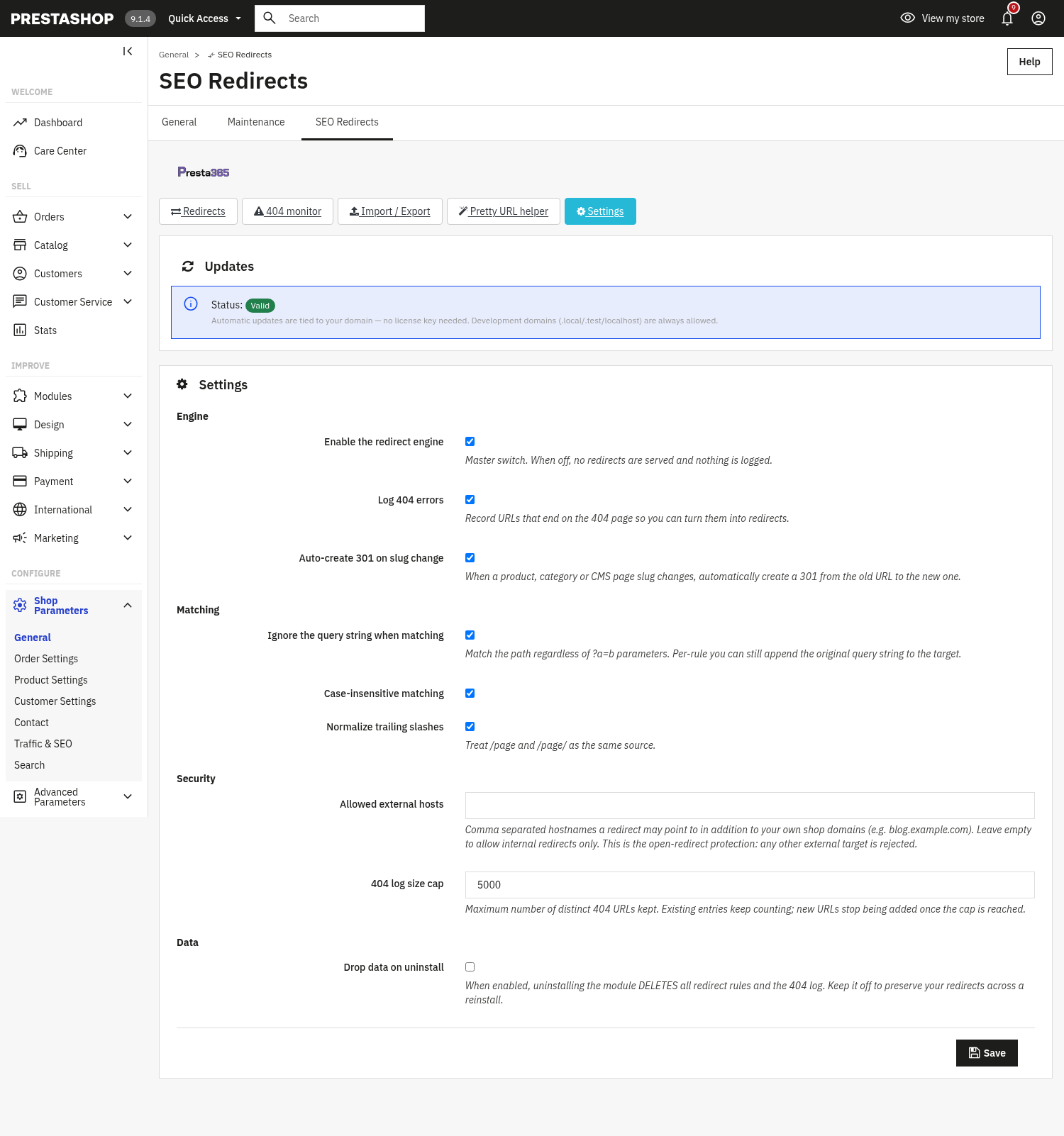
Settings master switch
The Settings tab groups the engine switch, matching behaviour, the open-redirect security and data handling.
- Enable the redirect engine: master switch. When off, no redirects are served and nothing is logged.
- Log 404 errors: record URLs that end on the 404 page so you can turn them into redirects.
- Auto-create 301 on slug change: when a product, category or CMS page slug changes, automatically create a 301 from the old URL to the new one.
- Ignore the query string when matching: match the path regardless of
?a=bparameters (you can still append the original query string per rule). - Case-insensitive matching and Normalize trailing slashes: treat
/Page,/pageand/page/as the same source. - Allowed external hosts: comma-separated hostnames a redirect may point to besides your own shop domains. Leave empty to allow internal redirects only, this is the open-redirect protection; any other external target is rejected.
- 404 log size cap: the maximum number of distinct 404 URLs kept.
- Drop data on uninstall: when enabled, uninstalling deletes all rules and the 404 log. Keep it off to preserve redirects across a reinstall.
3. When to use 301, 302, 404 or 410
A 404 answers “does anything live at this address” with no, today, with no promise about tomorrow. A 301 answers a different question: “what you were looking for still exists, but permanently moved here”, and transfers ranking signals to the new address over time. Getting it wrong one way throws away links and ranking history; getting it wrong the other way (a 301 to an unrelated page just to avoid a 404) teaches the search engine that your redirect map cannot be trusted.
The choice in short
- The content moved and still exists: a 301, to the single most relevant replacement, not to the homepage as a catch-all.
- The content is temporarily unavailable but will come back at the same address: a 302, not a 301, so the search engine keeps the original indexed and checks back later.
- The content is gone with no direct replacement: a 404, or a 410 if you know for certain it will never come back (search engines tend to drop those URLs from the index faster).
- The content never existed at that address: a plain 404, nothing further needed.
The soft 404 to avoid
A soft 404 is a page whose text tells a visitor “product not found” while the server still answers 200 OK. Search engines notice the mismatch and treat the URL as an error anyway, except it wastes a normal indexing slot instead of being handled as the error it is. PrestaShop core answers 404 correctly when a product does not exist: a soft 404 usually appears when a theme or module intercepts the page and shows a “not found” message with a 200 code. If a page's text says something is missing, its status code should say so too.
Crawl budget is real traffic, with our own store's numbers
Search engines, and increasingly AI crawlers, allocate a rough daily request budget to each domain: every request spent on a redirect chain or a stale 404 is a request not spent on a page that matters. This is not abstract. On our own store, before a routine cleanup, the visit-tracking filter turned out to be using a bot signature list from 2010: it logged 43,478 "visits" a day from bots, against roughly 300 real people, and the tracking data had grown to 1.4 GB before cleanup brought it down to 24 MB. Separately, a single crawler (Meta's) was making 38,000 requests a day, around 80% of all traffic the server received, until a targeted rule was added.
410: when it is the right call, and when it backfires
A 410 always has to be declared on purpose: it communicates "there will never be anything here again", not just "there is nothing here now". Using it without that certainty is the costliest mistake among the four codes. Two typical cases: a product out of stock but coming back (a 410 here discourages the engine from rechecking the URL right when you want it to: a 404, or a 302 to a heads-up page, is the right tool), and a rule that is too broad on a wildcard pattern or a query-string condition, which can permanently shut the door on legitimate traffic that only shares part of the pattern.
What a properly built 410 looks like
In the module, picking the 410 type makes the target field unnecessary, it is ignored. The response fires as early as possible in the request lifecycle, before the application builds the theme or fetches the product from the database, and includes three elements often forgotten when a 410 is hand-rolled: a real 410 Gone HTTP status (not a 200 with "unavailable" text), an X-Robots-Tag: noindex header, and a minimal page body translated into the visitor's language.
A real case: a crawler looping on a poisoned parameter
On our own store, a crawler (Meta's) was looping on /login?back=... URLs that still carried the store's old domain inside the parameter value: over 36,000 requests in a single night, more than 90% of all traffic, each served with a 200 response and a full page render, the same CPU cost as a genuine request. A single 410 rule with a query-string condition solved it without touching legitimate traffic: the rule only fires when the back parameter contains the old domain, not on every request to /login. Verified on three different PrestaShop versions: /login?back=http://old-domain.example/x and /login?back=https://old-domain.example/login return 410, while /login?back=/my-account (legitimate traffic) still returns 200, unchanged.
Redirect chains: the quiet tax
A single 301 costs almost nothing. A chain of three or four hops forces every crawler and every visitor to make as many requests to reach one page, and search engines follow only a limited number of hops before giving up. Every time a URL changes again, redirect the original straight to the current final destination instead of adding another hop on top of the last one: flattening chains as soon as you find them is one of the most useful cleanups on a redirect map built up over time.
4. Check that it works
3. Check that it works
- In Settings, make sure "Enable the redirect engine" is on, then add a redirect (e.g.
/old-page→/new-page) and visit the old URL, you should land on the new one. - Visit a URL that does not exist: with "Log 404 errors" on it appears in the 404 monitor, where Create 301 pre-fills the rule form with that URL.
- Export your rules to CSV, then re-import the file, the import report shows how many were imported or skipped.
- Try a redirect to an external, non-whitelisted host: it is rejected (open-redirect protection).
5. FAQ
What is the difference between 301 and 302?
301 is a permanent redirect (passes SEO value to the new URL); 302 is temporary. Use 301 for moved pages and 302 only for short-lived changes.
Can a redirect point anywhere?
No. Targets must be an internal path or a URL on your shop or a whitelisted host. This open-redirect protection applies to manual rules, CSV imports and saved rules alike.
Do wildcards and regex work?
Yes. Turn on "Pattern matching" on a rule to use * and ? wildcards or a delimited regex; safe back-references $1..$9 can be used in the target. Unsafe regex is rejected.
Will it slow down my shop?
No. Matching is lightweight and runs only when needed, and it is compatible with any theme through standard hooks.