Migrating from Magento to PrestaShop 9: what moves, what you lose, what it costs
From Magento to PrestaShop 9. Many Magento stores run versions that no longer get security updates, and the people running them wonder whether to upgrade or change platform. Here is what really transfers, what you lose, where the real work is and what it costs, with the numbers of a real project.
Why this comes up now
Magento is not dead, but it is changing. According to Store Leads, there were 151,845 live Magento stores worldwide in the third quarter of 2023 and 101,329 in the third quarter of 2026: a third fewer in three years. The same count also shows PrestaShop shrinking (17% down in the last year), so part of the drop comes from the method. The figure that matters most, if you sell in Southern Europe, is the ratio between the two platforms.
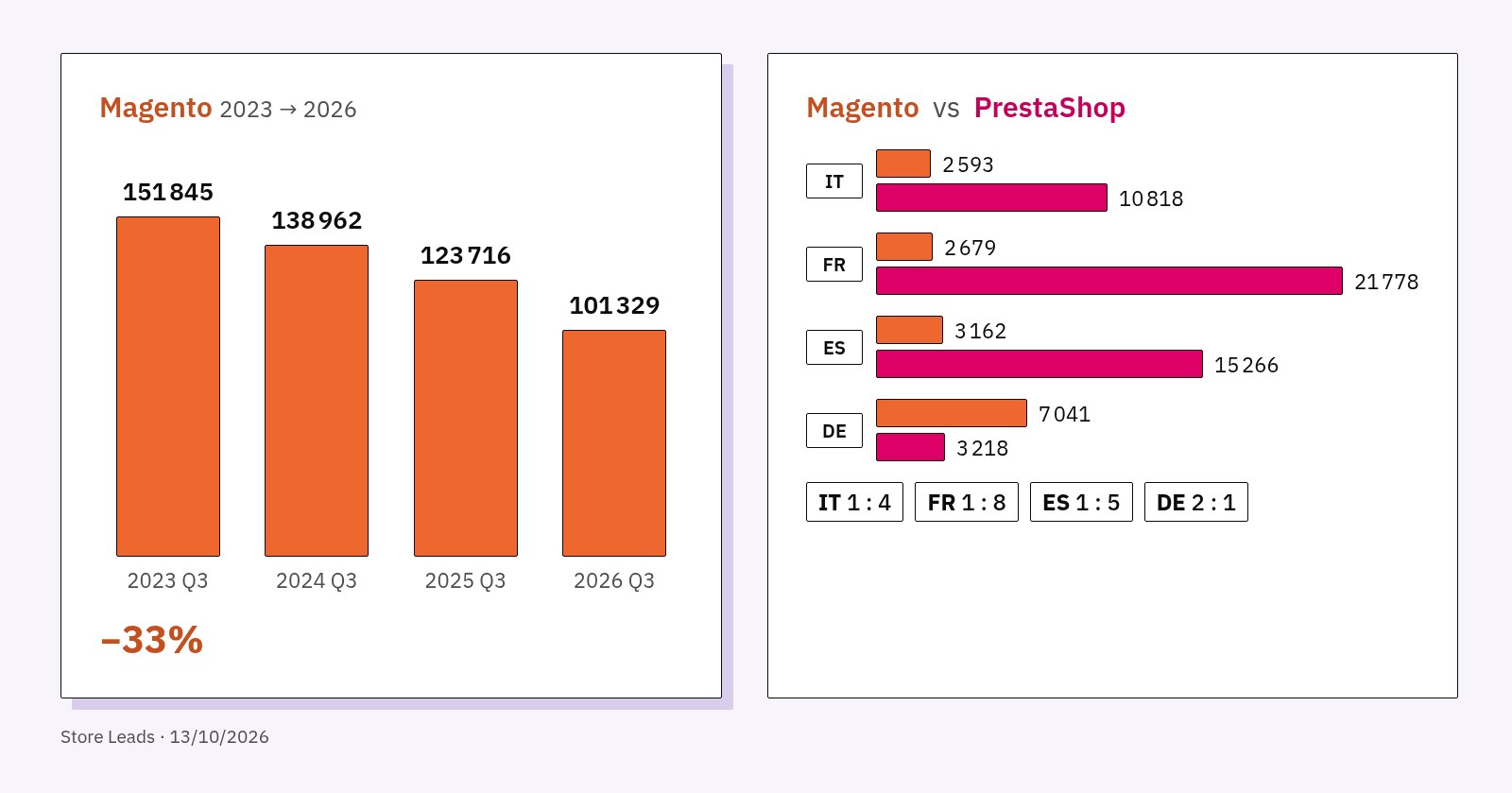
Italy has 2,593 Magento stores against 10,818 on PrestaShop; France 2,679 against 21,778; Spain 3,162 against 15,266. Only in Germany is Magento more widespread. For an Italian, French or Spanish store this means more agencies, more modules and more developers on the other side.
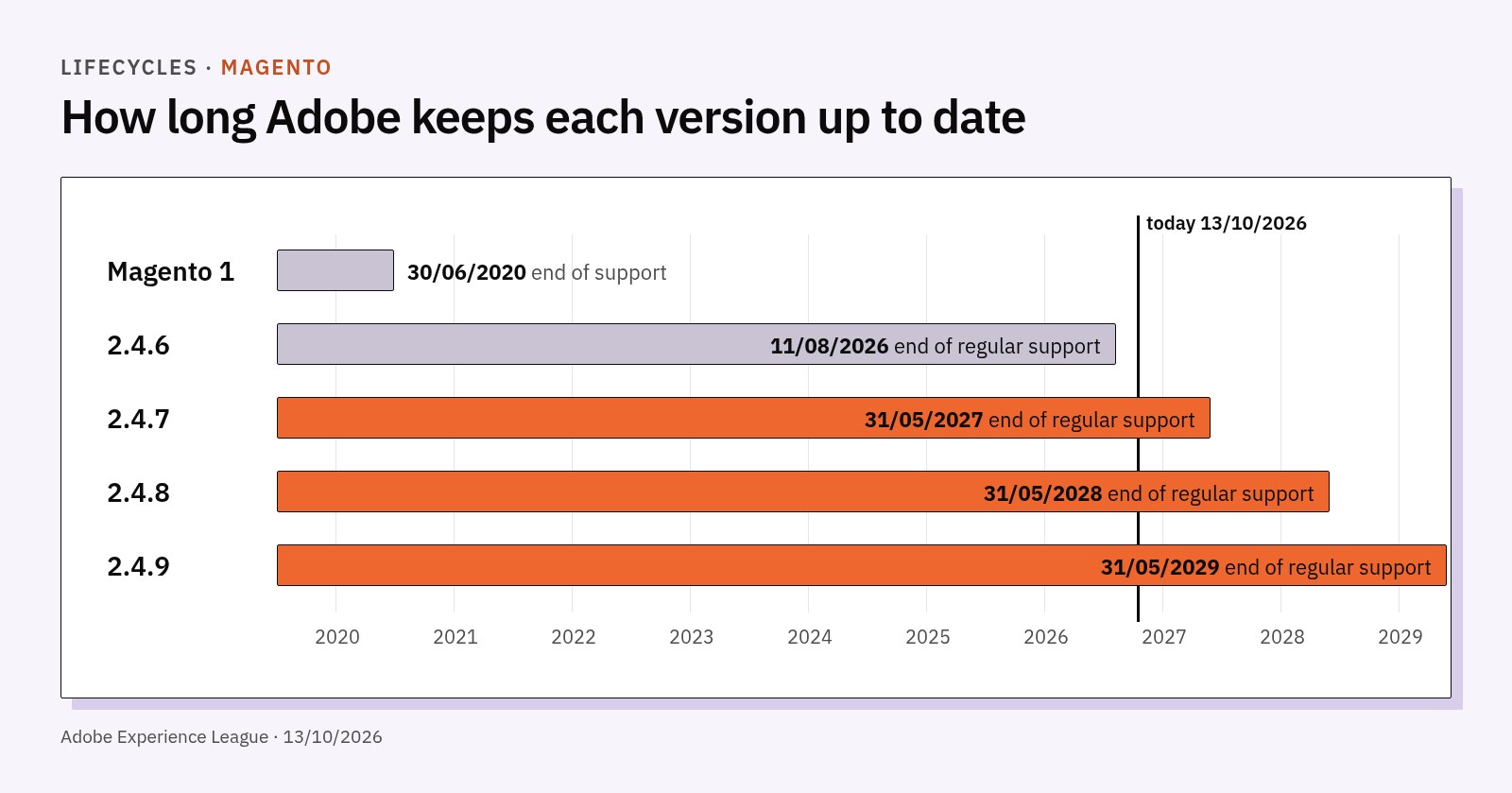
Then there are the deadlines. Magento 1 has been out of official support since 30 June 2020: whoever is still there runs a community project (OpenMage) and extensions that are often abandoned. On Magento 2, Adobe ended regular support for version 2.4.6 on 11 August 2026; 2.4.7 runs until 31 May 2027 and 2.4.8 until 31 May 2028. Only Adobe Commerce customers get one more year of extended support: for 2.4.6, until 31 August 2027.
Upgrading Magento 2 to the next version is a project in itself: Composer dependencies, extensions to buy again or update, a theme to check. When the bill for an upgrade gets close to the bill for a migration, the question "stay or move?" becomes a fair one.
Two different architectures, neither better than the other
Magento 2.4 is built for large catalogues and technical teams. Adobe requires a search engine on every installation since 2.4 (Elasticsearch or OpenSearch), and for 2.4.8 it lists PHP 8.3 or 8.4, MariaDB or MySQL, a Valkey cache, Varnish and RabbitMQ for queues. PrestaShop 9 asks for less: an Apache or Nginx web server, PHP, MySQL 5.7 or MariaDB 10.2 at minimum and 512 MB of memory per script. On PrestaShop an external search engine is a choice, not a requirement.
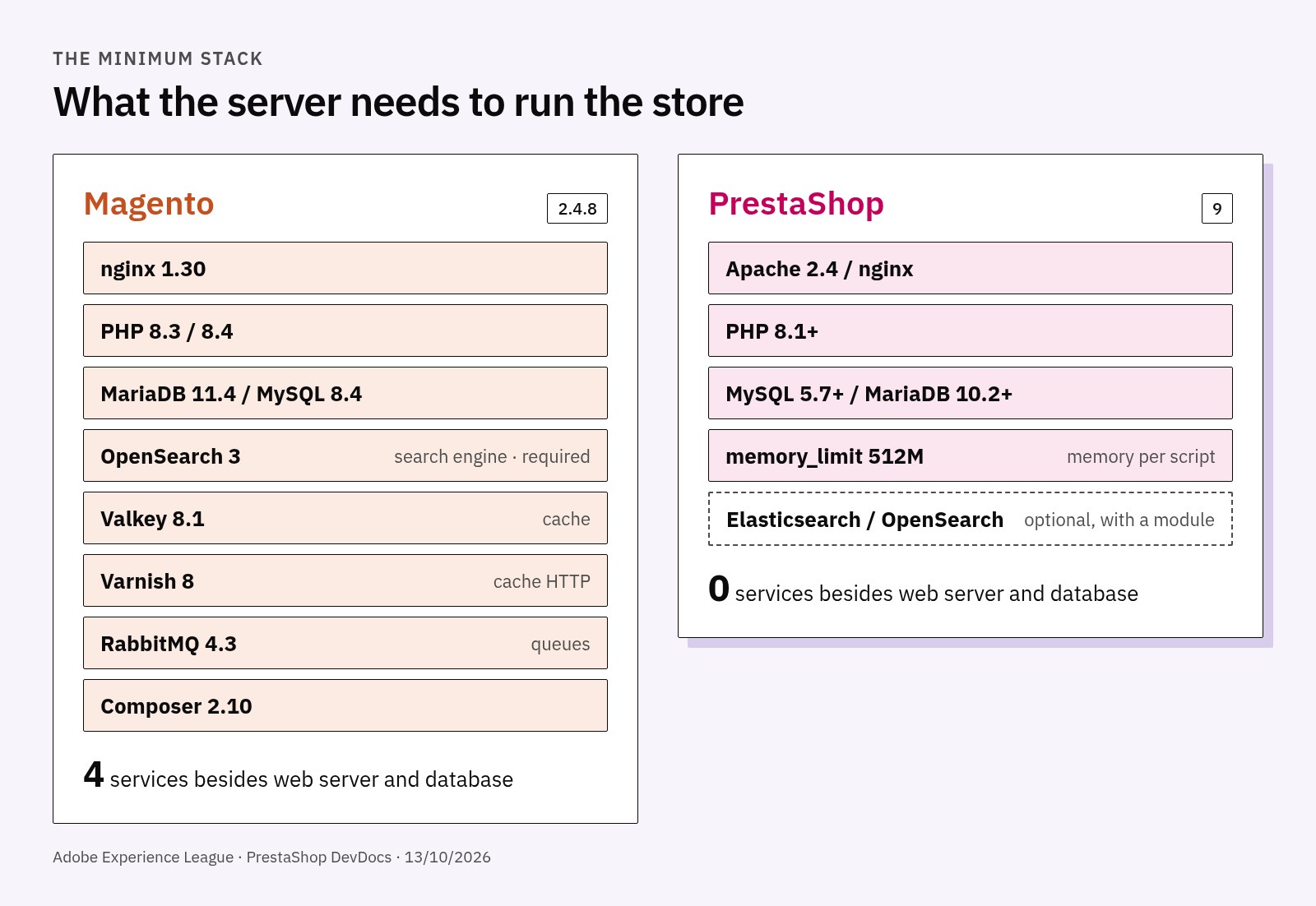
The practical consequence is twofold. PrestaShop costs less to host and to maintain, and finds more developers in Italy, France and Spain. In exchange, some things that Magento already has built in (search on a dedicated engine, configuration scopes per website and per store view, some B2B features of Adobe Commerce) must be added on PrestaShop with modules or development.
What transfers, what you lose, what you rebuild
A migration is not copy and paste. It pays to split everything into three groups from day one.
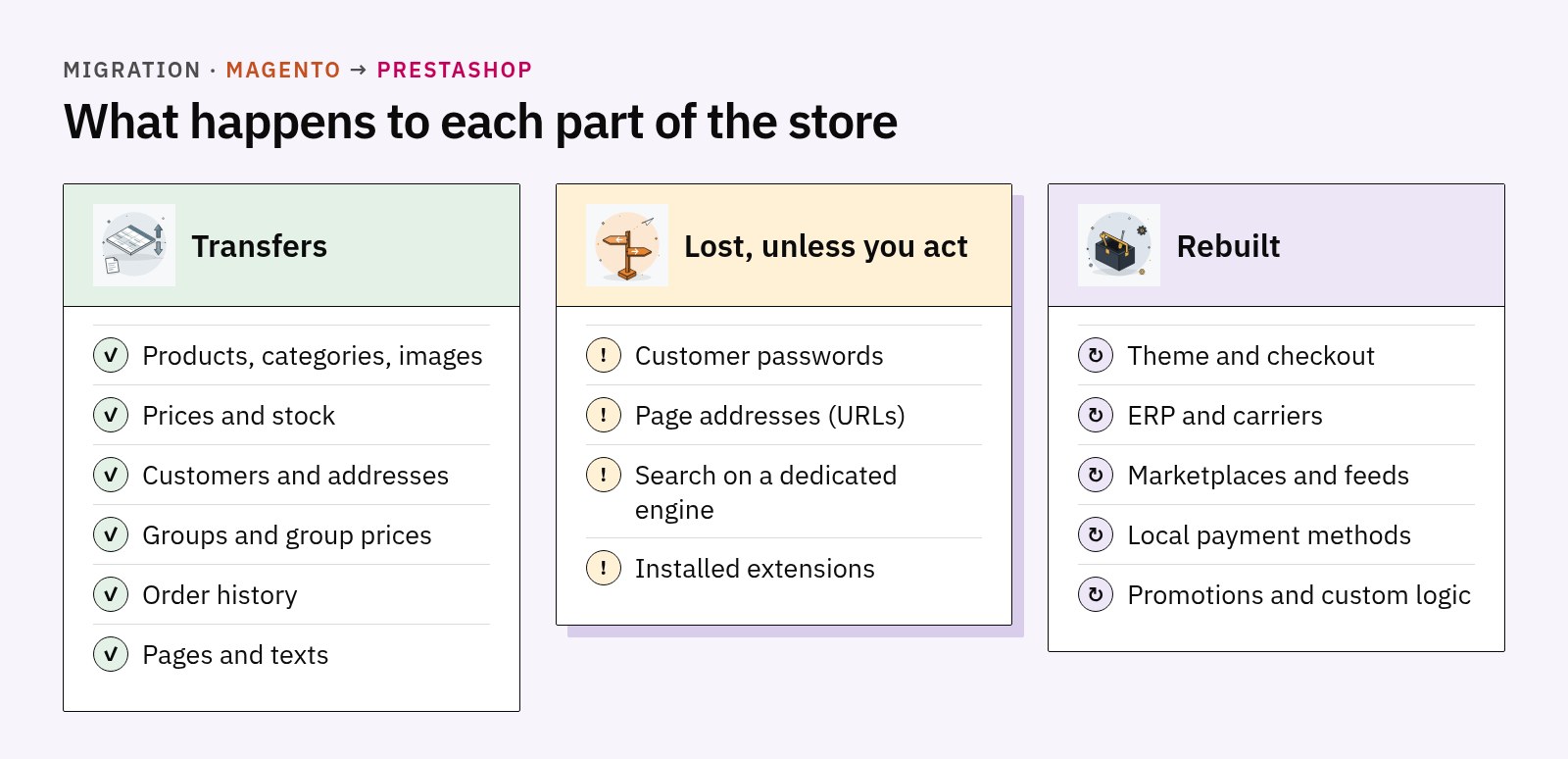
Transfers
- Catalogue. Products, categories, images, prices, stock, attributes. Magento configurable products become products with combinations in PrestaShop; bundle products become packs, with some limits to check case by case.
- Customers and addresses. Together with customer groups and, where needed, prices per group and per quantity, which PrestaShop handles as specific prices.
- Order history. Needed for support, returns and accounting. Orders stay linked to customers but do not restart as new orders.
- Pages and content. CMS pages and texts move over, but the Page Builder structure has no direct equivalent: composed pages must be rebuilt.
Lost (unless you act)
- Customer passwords. Magento and PrestaShop store passwords in different formats, and an encrypted password cannot be converted. There are two ways: ask everyone to reset it, with a clear message, or a development that recognises the old password at the first login and saves it in the new format. The second costs more but avoids a flood of support requests.
- Page addresses. Magento and PrestaShop build URLs differently, so almost all of them change. Without 301 redirects, page by page and language by language, you lose rankings and links. We cover this in detail in our guide to 301 redirects and 404s after a migration.
- Search on a dedicated engine. On Magento 2.4, search and filters already run on Elasticsearch or OpenSearch. Out of the box PrestaShop searches the database, which is fine for small catalogues and slows down on large ones. With tens of thousands of products, search speed must be planned before, not discovered after.
- Extensions. No Magento extension works on PrestaShop. Each one must be replaced by a module or rewritten.
Rebuilt
- Theme and checkout. The theme does not move: you choose or design a PrestaShop 9 theme.
- Integrations. ERP, carriers, marketplaces, price comparison feeds, local payment methods. This is where the project cost is decided, as the case below shows.
- Custom rules and logic. Complex promotions, price lists per channel, custom PDF documents.
A real case: where the work is
In 2026 we analysed the move to PrestaShop 9 of an Italian sports brand. The store ran on Magento 1.7 used as an operations hub: about 1,100 products in 35 categories, about 239,000 customers and about 335,000 historical orders, with 2,000 to 2,200 orders a month.
At first sight it looks like a small catalogue. The real work was elsewhere: a sector marketplace connected through Mirakl (the first sales channel), Amazon in five countries and eBay, an ERP connected through CSV files and FTP, seven carriers, about ten payment methods including cards, financing and pay-in-instalments, feeds for ten price comparison sites, a newsletter, external search and customised PDF invoices.
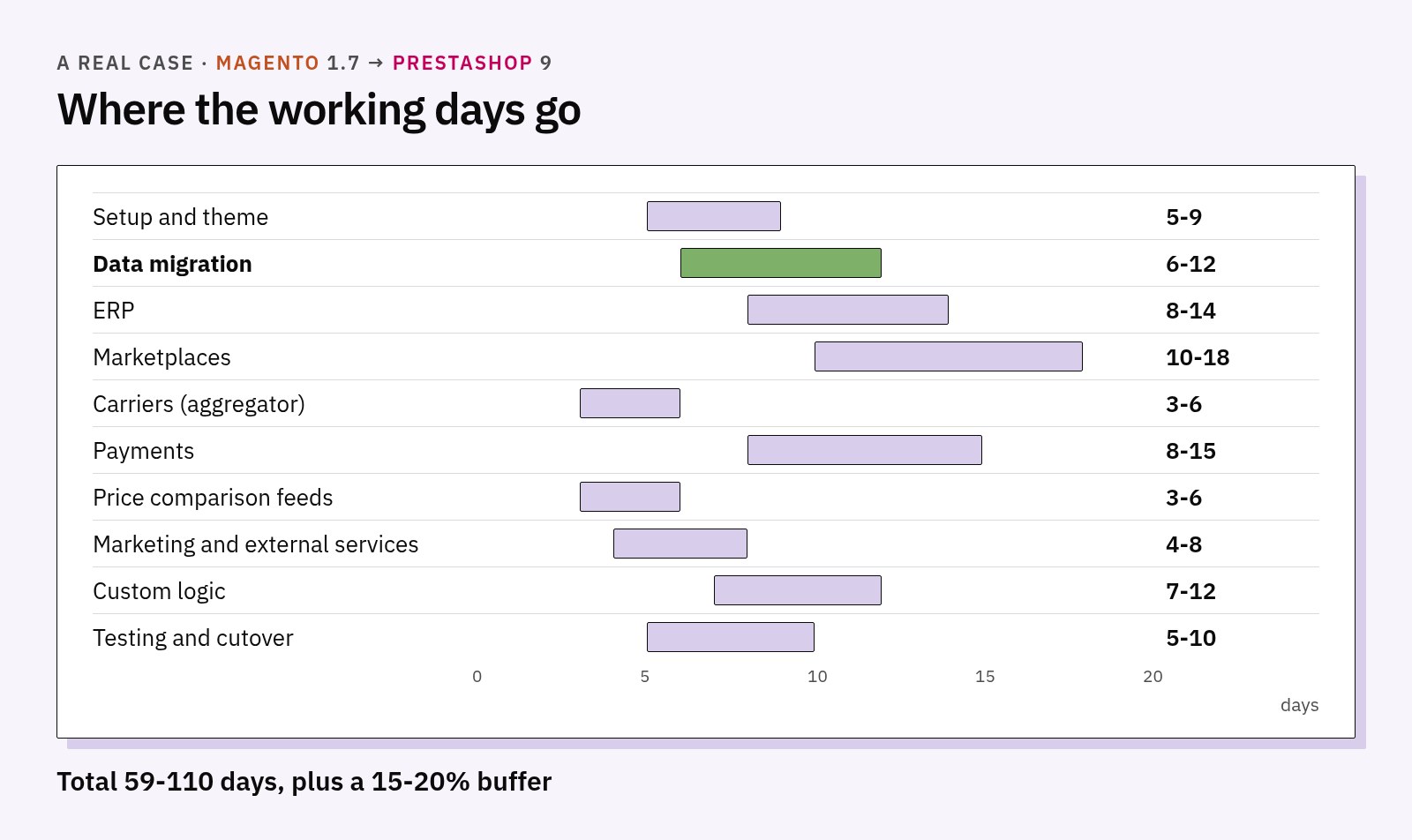
The estimate, in working days, was between 59 and 110 days, plus a 15-20% buffer for surprises: between 68 and 130 days in total, that is 3.5 to 5 months for one person full time. Data migration (products, customers, orders) accounted for 6 to 12 days, about a tenth of the total. The rest was integrations, payments and testing.
The lesson applies to almost every mid-size Magento store in Italy: they have an ERP, at least one marketplace and several carriers connected. For them a fixed "blind" price does not hold. You first need a map of the integrations, as a phase of its own, and only then a quote.
What it costs
Indicative prices. Prices and fees read on 13 October 2026 on the official websites: they change over time, with offers, with monthly or yearly billing and with the country. Before deciding, always check the official pages.
On the market there are automated tools that move only the data, such as LitExtension or Cart2Cart, priced from a few tens of dollars to a few hundred depending on data volume and included services, and services that move only the catalogue for a few hundred euros. They are useful, but they leave out design, features, redirects and integrations. At the other end, a complete rebuild by a consultancy costs from 15,000 to 60,000 euros according to the industry sources we read.
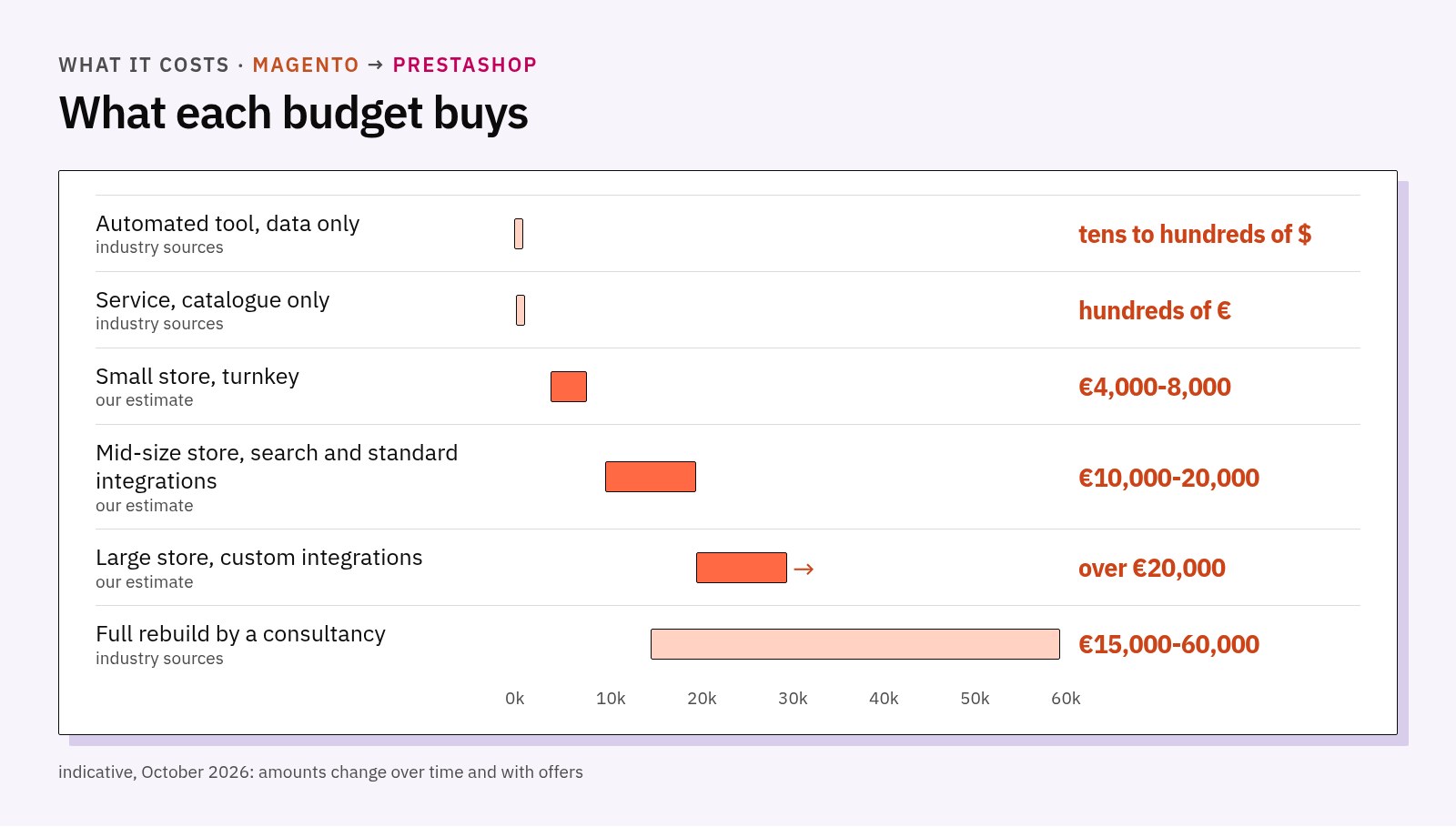
Our ranges, indicative and as of October 2026, are these:
| Store size | What is included | Indicative cost |
|---|---|---|
| Small | Up to 5,000 products, customers and orders, 301 redirects, standard PrestaShop 9 theme, at most 3 standard integrations | 4,000-8,000 euros |
| Medium | 5,000-25,000 products, search on a dedicated engine, 2-4 standard integrations (carrier, ERP via CSV, feeds) | 10,000-20,000 euros |
| Large, with custom integrations | Marketplaces, two-way ERP, local payments, custom logic, as in the case above | by the day, over 20,000 euros |
Indicative Presta365 estimates, October 2026: real costs depend on the project and may change over time.
These are estimates, not a price list: the real figure comes after the analysis. Two items move the bill more than any other: how many custom integrations are needed and how clean the starting data is.
How we do it: eight steps
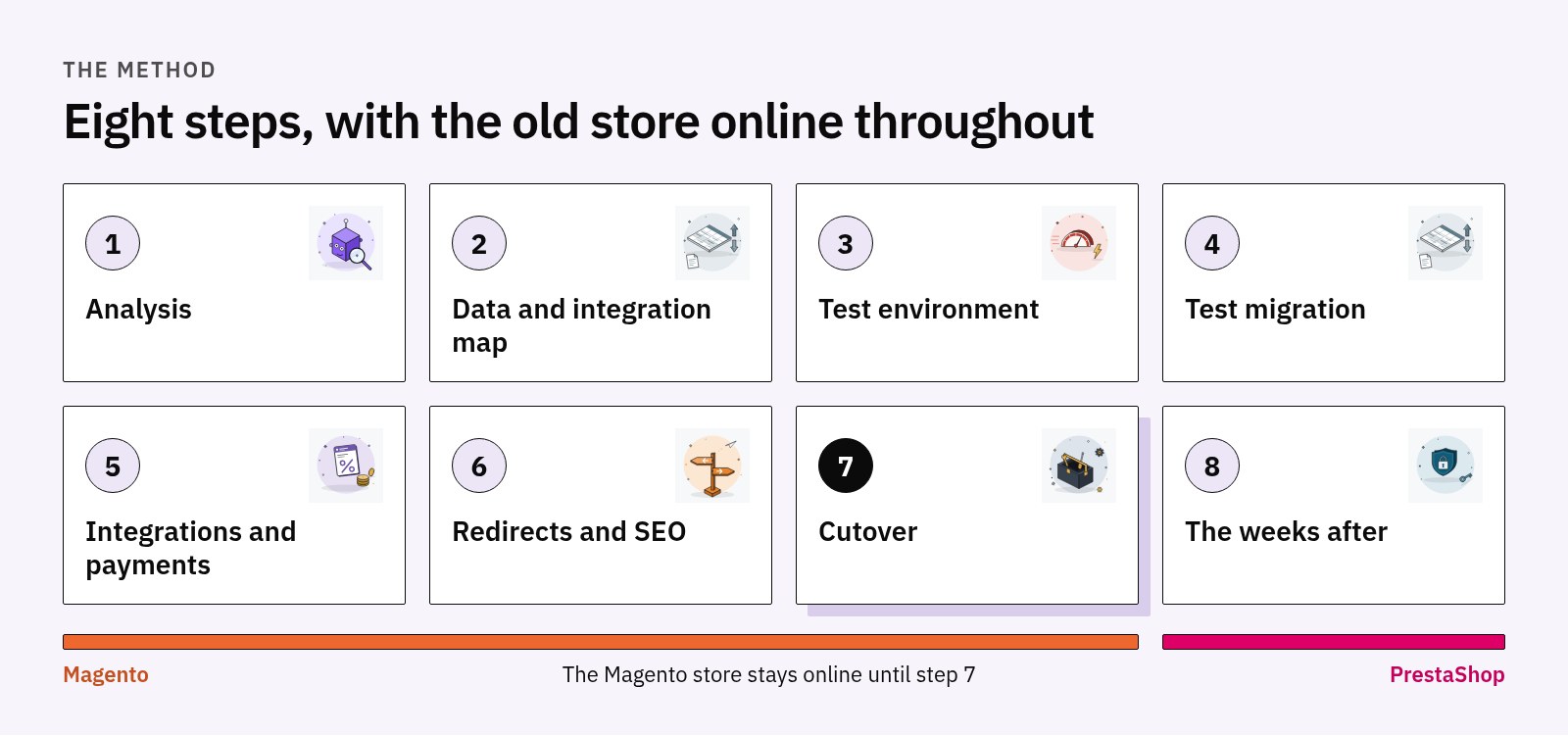
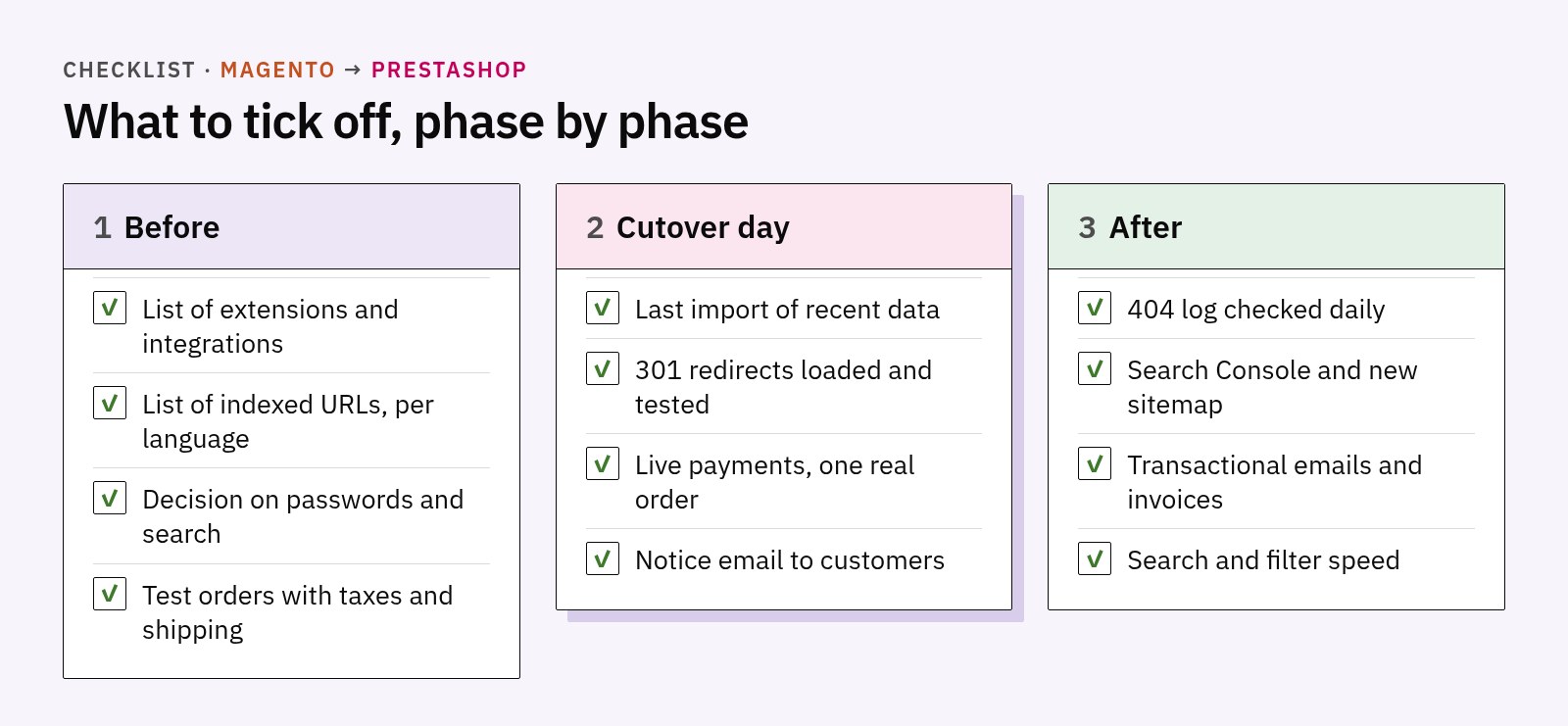
- Analysis. Catalogue, languages, installed extensions, integrations, organic traffic. At the end you know whether it pays off, and how much.
- Data and integration map. Every Magento data item has a place in PrestaShop, every integration has a chosen replacement: existing module, aggregator or development.
- Test environment. A separate PrestaShop 9, while the Magento store stays online and untouched.
- Test migration. Products, customers, orders. Prices, taxes, combinations and images checked on a sample.
- Integrations and payments. Connected in test, with test orders through to shipping.
- Redirects and SEO. A list of all indexed URLs, a 301 redirect table for each language, spot checks before the switch.
- Cutover. Last import of recent data, orders paused for a few hours, domain switched.
- The weeks after. Checking 404s, emails and payments. A list of what usually breaks is in what breaks the week after you migrate to PrestaShop.
Redirects and search: the two things not to postpone
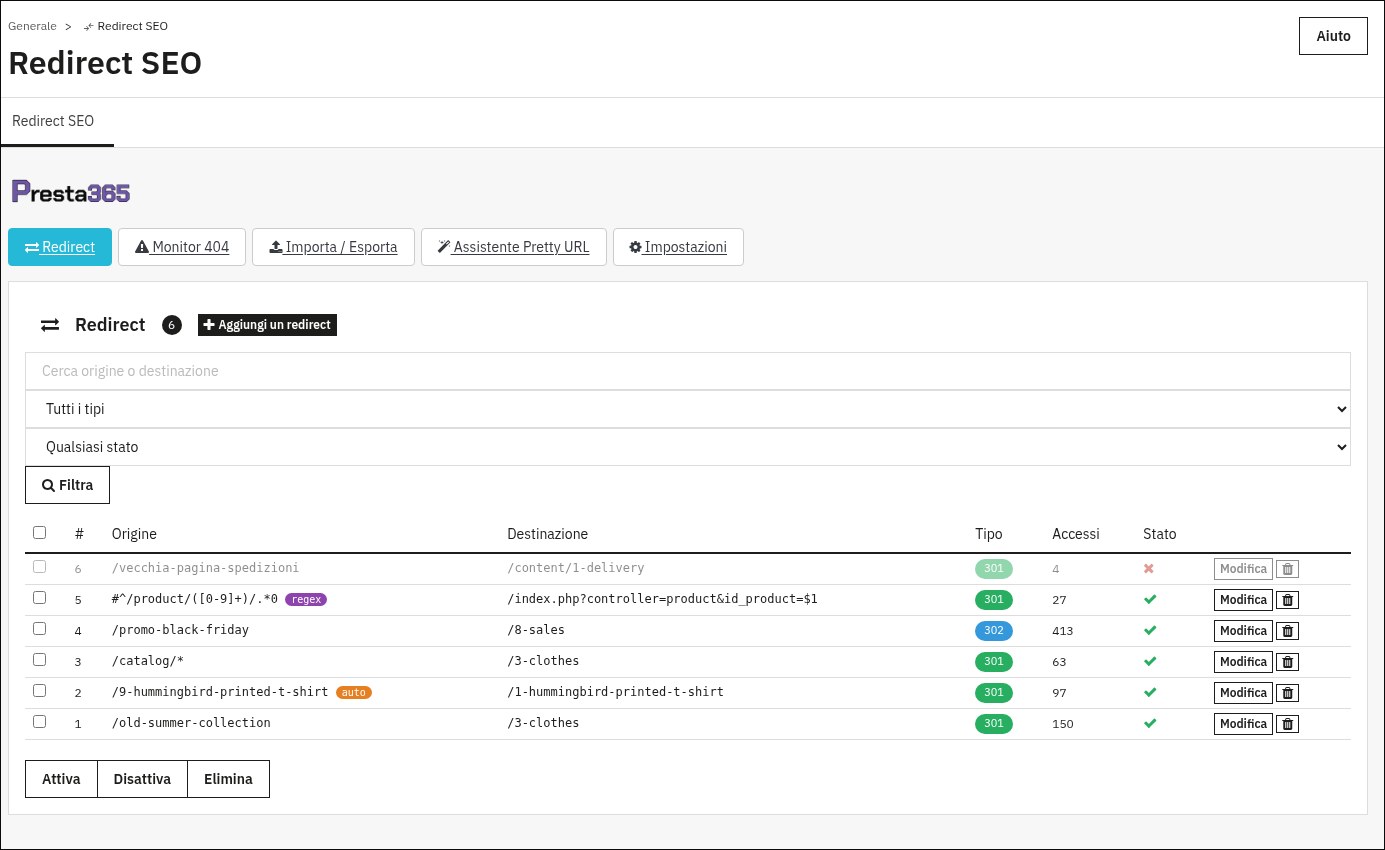
Redirects are prepared before the switch, not after. You need the list of URLs Google knows (Search Console and the old store's sitemap), an old address to new address table, and a tool that logs 404s in the following days so you can close the ones that slipped through. On PrestaShop this is done with a dedicated module; ours is SEO Redirects, which imports the table from CSV, accepts wildcard rules and keeps a 404 log.
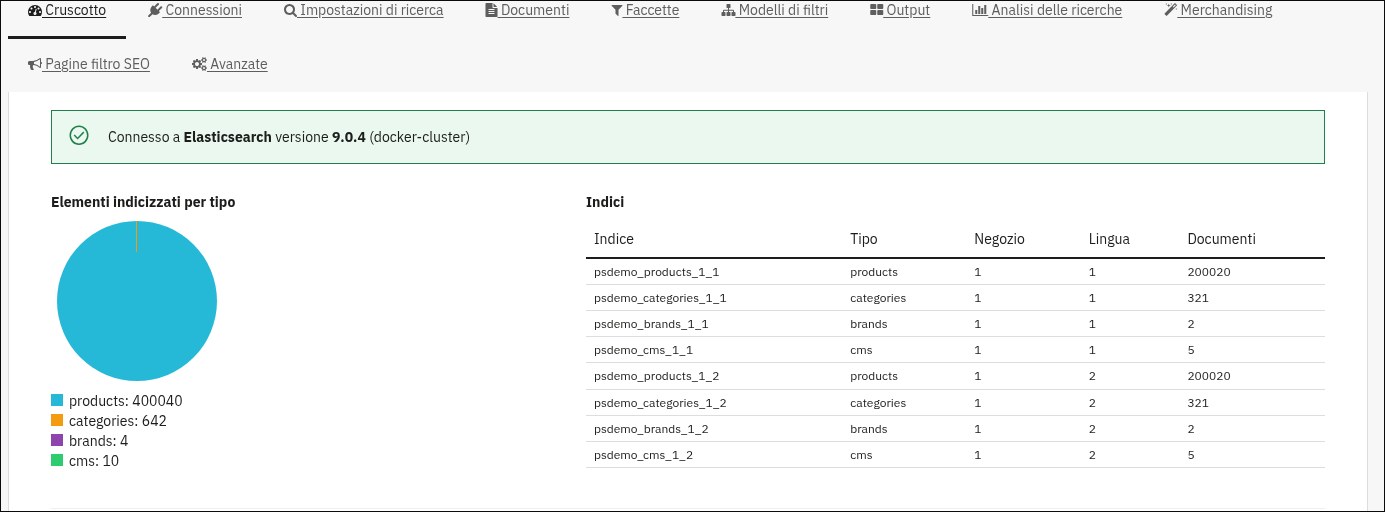
Search should be decided based on the catalogue. Below a few thousand products, PrestaShop search with faceted filters is enough. Above that, people coming from Magento are used to filters and results served by a dedicated engine and notice at once if they get slow. In that case a module that brings Elasticsearch to PrestaShop makes sense, such as our Elasticsearch Search and Faceted Navigation.
When it does not pay off
Not every Magento store should leave Magento. If you have an in-house technical team skilled in Magento, a very large catalogue with many websites and store views, or you use Adobe Commerce with built-in B2B features such as negotiable quotes, upgrading is often still the cheaper road. Migration pays off more for stores on Magento 1 or OpenMage, for small or mid-size Magento 2 stores stuck on 2.4.6 or earlier, and for those paying to maintain a platform more complex than they need. If you are weighing the other direction, from PrestaShop to Shopify, we also wrote about when migrating from PrestaShop to Shopify pays off. If the choice of platform is still open, our comparison of WooCommerce, Shopify, PrestaShop and Magento puts them side by side.
Frequently asked questions
Will we lose our Google rankings?
Not necessarily. If every old indexed address leads with a 301 to the right page, in every language, rankings are largely kept. A temporary dip in the first weeks is normal; the real drop comes when redirects are missing.
Do customers have to reset their password?
It depends on the choice made during the project: either they reset it through an email invitation, or we recognise it at the first login with a dedicated development. Either way it is worth telling them in advance.
How long does it take?
A small store without special integrations moves in a few weeks. A store with an ERP, marketplaces and local payments takes months, as in the case above.
Can we keep our Magento extensions?
No. Every extension must be replaced by a PrestaShop module or by development. That is why the list of extensions is the first document we ask for.
Let's talk
Tell us how your store is built: Magento version, number of products, languages, integrations. We reply within 24 hours and, after the analysis, tell you whether the move pays off. The details of what we do are on our PrestaShop services page.
Sources
Amounts are indicative as of the reading date given next to each source: prices and fees change over time, with offers, with billing and with the country.
- Store Leads, Magento statistics (live stores, quarterly series, countries): https://storeleads.app/reports/magento, read on 13/10/2026
- Store Leads, PrestaShop statistics: https://storeleads.app/reports/prestashop, read on 13/10/2026
- End of Magento 1 support on 30/6/2020 and OpenMage status: https://openmage.org and agency pages read through search on 13/10/2026
- Adobe, Adobe Commerce version lifecycles: https://experienceleague.adobe.com/en/docs/commerce-operations/release/versions, https://experienceleague.adobe.com/en/docs/commerce-operations/release/planning/lifecycle-policy, read on 13/10/2026
- Adobe, Commerce 2.4.8 system requirements: https://experienceleague.adobe.com/en/docs/commerce-operations/installation-guide/system-requirements, read on 13/10/2026
- Adobe, search engine required since 2.4: https://experienceleague.adobe.com/en/docs/commerce-operations/installation-guide/prerequisites/search-engine/overview, read on 13/10/2026
- PrestaShop, PrestaShop 9 system requirements: https://devdocs.prestashop-project.org/9/basics/installation/system-requirements/, read on 13/10/2026
- Catalogue-only migration service, a few hundred euros: https://shop.prestalia.it ("Magento to PrestaShop migration service" page), read on 13/10/2026
- Automated migration tools, priced by data volume and included services: for example https://litextension.com/pricing.html, read on 13/10/2026
- Rebuild costs with a consultancy (15,000-60,000 euros): agency pages, for example https://kolonell.com/en/blog/prestashop-to-custom-platform-migration-2026, read on 13/10/2026 (indicative figures)
- Sports brand case: Presta365 internal analysis and estimate, June 2026