
Product & Store Reviews with Google Rich Snippets. Product & Store Reviews collects product and store reviews with star ratings, photos, multi-criteria scores, a verified-purchase badge and helpful votes. Moderate everything from the back office, reply to customers, send reminder emails, and output valid schema.org JSON-LD so your products can show star ratings in Google results. No coding, no theme edits.
Product & Store Reviews collects product and store reviews with star ratings, photos, multi-criteria scores, a verified-purchase badge and helpful votes. Moderate everything from the back office, reply to customers, send reminder emails, and output valid schema.org JSON-LD so your products can show star ratings in Google results. No coding, no theme edits.
1. Installation
- In the back office go to Modules → Module Manager → Upload a module and select the module ZIP.
- Once installed, click Configure to open the setup wizard.
.local, .test, localhost) are always allowed. When a new version is available it is shown right inside the module.If instead of the confirmation you read "Upload failed", PrestaShop may have disabled the module without telling you: your settings and data stay where they are. How to update a module, and what to do if it says "Upload failed".
2. Configuration: step by step
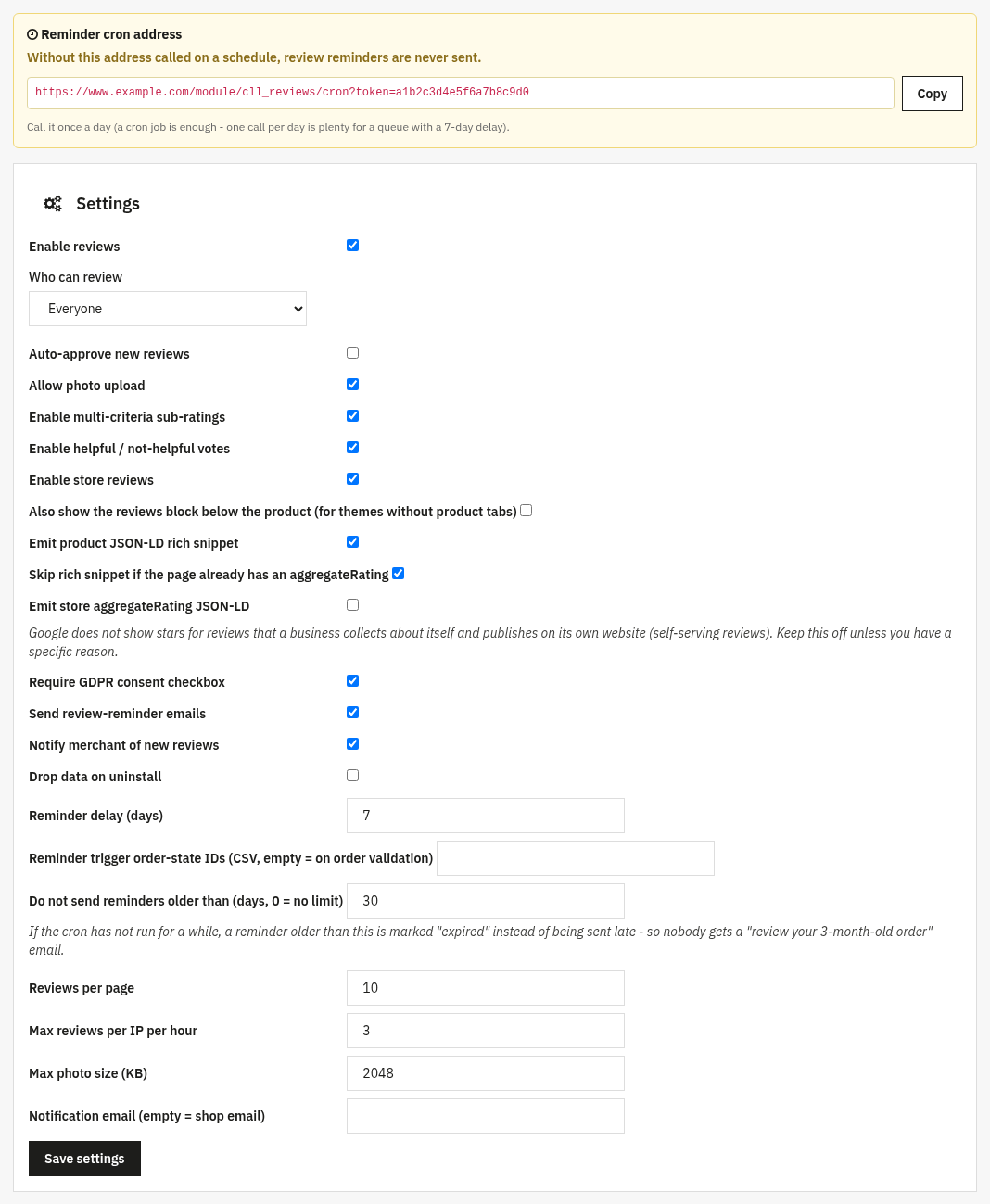
The Configure screen has a moderation list (approve, reject or reply to reviews) and a Settings panel where you decide who can review, what reviewers can attach, and which emails and rich snippets are sent. The options below are all on the Settings panel.
Settings
Who can review & moderation: control submission and publishing:
- Enable reviews: the master on/off switch for the whole module.
- Who can review: Everyone or Only verified buyers. Verified buyers get a verified-purchase badge automatically.
- Auto-approve new reviews: publish immediately, or leave off to moderate every review by hand first.
- Require GDPR consent checkbox: add a consent box to the form. The form is protected by a hidden anti-bot field, the per-IP limit and moderation (the cll_captcha option was removed in version 1.2.3).
- Max reviews per IP per hour: anti-spam limit (0 = unlimited).
What reviewers can add: enrich each review:
- Allow photo upload and Max photo size (KB): let customers attach photos and cap their size.
- Enable multi-criteria sub-ratings: add detailed scores (e.g. quality, value, delivery) on top of the main star rating.
- Enable helpful / not-helpful votes: let visitors vote reviews up or down.
- Enable store reviews: collect reviews about the store itself, not only products.
- Reviews per page: pagination of the review list.
- Also show the reviews block below the product: off by default, because the reviews appear in a tab of the product page; turn it on if your theme has no product tabs.
Emails & notifications: keep the loop going:
- Send review-reminder emails, Reminder delay (days) and Reminder trigger order-state IDs: automatically invite customers to review after an order (leave the states empty to trigger on order validation).
- Do not send reminders older than (days, 0 = no limit): if the cron has not run for a while, a reminder older than this is marked as expired instead of being sent late (default 30 days).
- Notify merchant of new reviews and Notification email: alert you when a review arrives (empty = the shop email).
Google rich snippets: earn the stars in search:
- Emit product JSON-LD rich snippet: output schema.org Product data with the aggregate rating on product pages.
- Skip rich snippet if the page already has an aggregateRating: avoid duplicate ratings when your theme already emits one.
- Emit store aggregateRating JSON-LD: output the store-level rating snippet. Off by default on new installs: Google does not show stars for reviews a store collects about itself (self-serving reviews), so the back office shows a notice while it is on.
Drop data on uninstall: off by default, so your reviews are kept if you uninstall the module.
3. Check that it works
- Open a product page on the front office, the review form and any approved reviews with stars should appear.
- Submit a test review and, if auto-approve is off, approve it from the back-office moderation list; try posting a merchant reply.
- With rich snippets on, paste a product URL into Google’s Rich Results Test and confirm the aggregate rating is detected.
- Place a test order and check the reminder email is queued after the configured delay.
4. FAQ
Will fake or spam reviews get published?
Only if you let them. Turn off auto-approve to moderate every review, restrict to verified buyers, and use the per-IP rate limit; a hidden field stops bots. When reviews are auto-approved or restricted to verified buyers, store reviews are also accepted only from customers with at least one valid order.
Do I need to edit my theme?
No. The reviews block and JSON-LD are added through standard hooks and work with any theme.
Will the rich snippet conflict with my theme?
No. Enable "Skip rich snippet if the page already has an aggregateRating" and the module steps aside when one is already present.
Can customers add photos?
Yes, when "Allow photo upload" is on. You can cap the file size with "Max photo size (KB)".